Wait for Event
Hold your Automations until a specific event is received.
A wait-until step holds the Automation until a specific event is received.
Unlike a delay, which resumes after a fixed time, this step resumes when something happens in your application.
Common use cases:
- Payment: Wait for a payment to succeed before sending a receipt.
- Adoption: Wait for a user to complete an action to unlock a feature.
- Verification: Wait for the user to verify their email before continuing.
How it works
Section titled “How it works”Add a Wait for event step and configure the event to wait for.
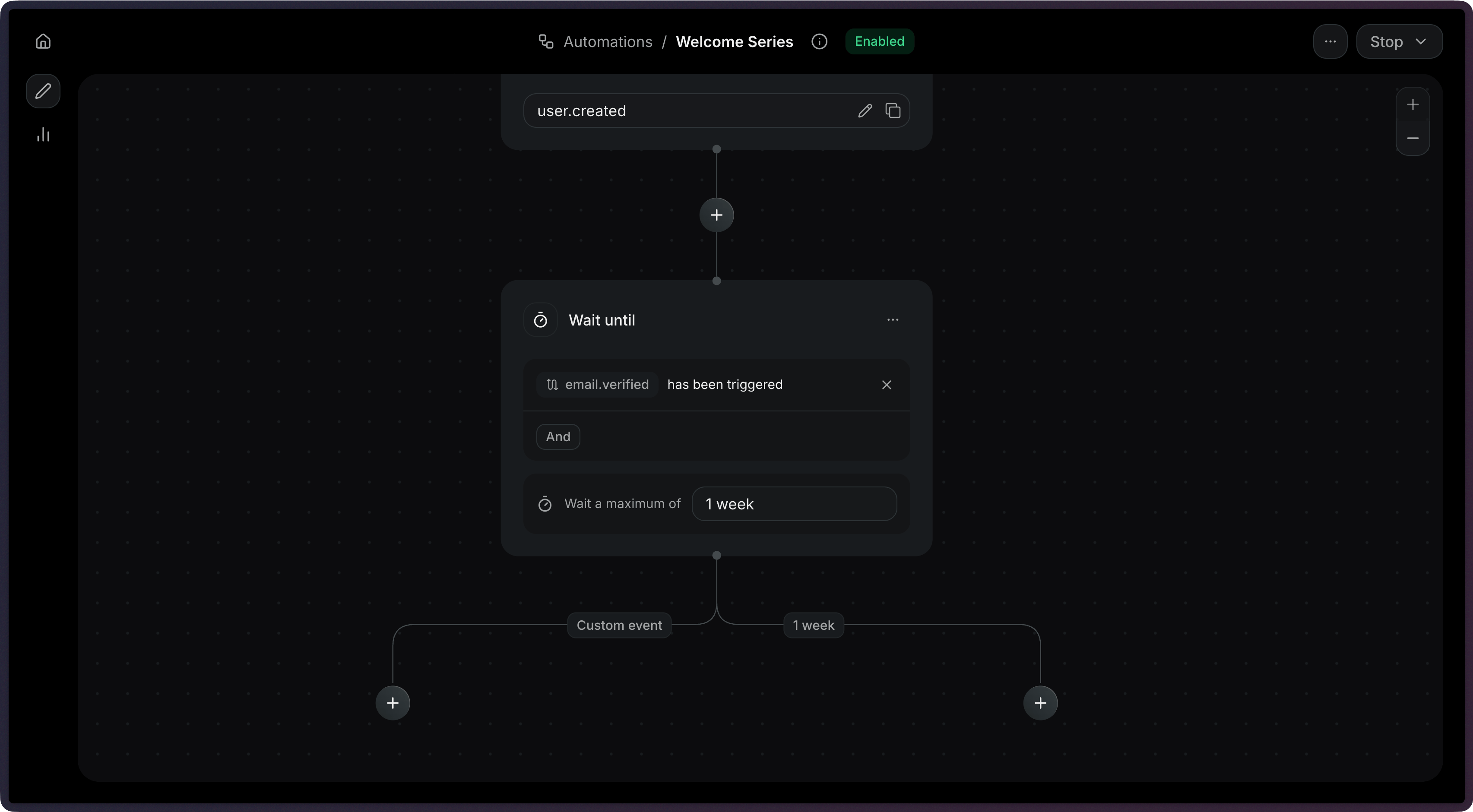
Add a wait_for_event step to your Automation's steps array.
import { Resend } from 'resend';const resend = new Resend('re_xxxxxxxxx');const { data, error } = await resend.automations.create({ name: 'Verification Reminder', steps: [ { key: 'start', type: 'trigger', config: { eventName: 'user.created' }, }, { key: 'verification', type: 'wait_for_event', config: { eventName: 'email.verified', timeout: '1 day', }, }, ], connections: [{ from: 'start', to: 'verification', type: 'default' }],});$resend = Resend::client('re_xxxxxxxxx');$resend->automations->create([ 'name' => 'Verification Reminder', 'steps' => [ [ 'key' => 'start', 'type' => 'trigger', 'config' => ['event_name' => 'user.created'], ], [ 'key' => 'verification', 'type' => 'wait_for_event', 'config' => [ 'event_name' => 'email.verified', 'timeout' => '24 hours', ], ], ], 'connections' => [['from' => 'start', 'to' => 'verification', 'type' => 'default']],]);import resendresend.api_key = "re_xxxxxxxxx"params: resend.Automations.CreateParams = { "name": "Verification Reminder", "steps": [ { "key": "start", "type": "trigger", "config": {"event_name": "user.created"}, }, { "key": "verification", "type": "wait_for_event", "config": { "event_name": "email.verified", "timeout": "24 hours", }, }, ], "connections": [{"from": "start", "to": "verification", "type": "default"}],}resend.Automations.create(params)require "resend"Resend.api_key = "re_xxxxxxxxx"params = { name: "Verification Reminder", steps: [ { key: "start", type: "trigger", config: { event_name: "user.created" }, }, { key: "verification", type: "wait_for_event", config: { event_name: "email.verified", timeout: "24 hours", }, }, ], connections: [{ from: "start", to: "verification", type: "default" }],}Resend::Automations.create(params)package mainimport "github.com/resend/resend-go/v4"func main() { client := resend.NewClient("re_xxxxxxxxx") params := &resend.CreateAutomationRequest{ Name: "Verification Reminder", Steps: []resend.AutomationStep{ { Key: "start", Type: resend.AutomationStepTypeTrigger, Config: map[string]any{ "event_name": "user.created", }, }, { Key: "verification", Type: resend.AutomationStepTypeWaitForEvent, Config: map[string]any{ "event_name": "email.verified", "timeout": "24 hours", }, }, }, Connections: []resend.AutomationConnection{ {From: "start", To: "verification", Type: resend.AutomationConnectionTypeDefault}, }, } client.Automations.Create(params)}use resend_rs::{ types::{ AutomationStatus, Connection, ConnectionType, CreateAutomationOptions, Step, TriggerStepConfig, WaitForEventStepConfig, }, Resend, Result,};#[tokio::main]async fn main() -> Result<()> { let resend = Resend::new("re_xxxxxxxxx"); let opts = CreateAutomationOptions { name: "Verification Reminder".to_owned(), steps: vec![ Step::Trigger { key: "start".to_owned(), config: TriggerStepConfig { event_name: "user.created".to_owned(), }, }, Step::WaitForEvent { key: "verification".to_owned(), config: WaitForEventStepConfig { event_name: "email.verified".to_owned(), timeout: Some("24 hours".to_owned()), filter_rule: None, }, }, ], connections: vec![Connection::new("start", "verification").with_type(ConnectionType::Default)], status: AutomationStatus::Disabled, }; let _automation = resend.automations.create(opts).await?; Ok(())}import com.resend.*;import com.resend.core.exception.ResendException;import com.resend.services.automations.model.AutomationConnection;import com.resend.services.automations.model.AutomationStep;import com.resend.services.automations.model.ConnectionType;import com.resend.services.automations.model.CreateAutomationOptions;import com.resend.services.automations.model.CreateAutomationResponseSuccess;public class Main { public static void main(String[] args) throws ResendException { Resend resend = new Resend("re_xxxxxxxxx"); CreateAutomationOptions options = CreateAutomationOptions.builder() .name("Verification Reminder") .steps( AutomationStep.trigger("start") .eventName("user.created") .build(), AutomationStep.waitForEvent("verification") .eventName("email.verified") .timeout("1 day") .build() ) .connections( AutomationConnection.builder() .from("start") .to("verification") .type(ConnectionType.DEFAULT) .build() ) .build(); CreateAutomationResponseSuccess data = resend.automations().create(options); }}using Resend;using System.Text.Json;IResend resend = ResendClient.Create( "re_xxxxxxxxx" );var startConfig = JsonSerializer.SerializeToElement( new { event_name = "user.created" } );var waitConfig = JsonSerializer.SerializeToElement( new{ event_name = "email.verified", timeout = "1 day",} );var resp = await resend.AutomationCreateAsync( new AutomationCreateData(){ Name = "Verification Reminder", Steps = new List<AutomationStepData> { new AutomationStepData { Ref = "start", Type = "trigger", Config = startConfig }, new AutomationStepData { Ref = "verification", Type = "wait_for_event", Config = waitConfig }, }, Connections = new List<AutomationEdge> { new AutomationEdge { From = "start", To = "verification", EdgeType = "default" }, },} );curl -X POST 'https://api.resend.com/automations' \ -H 'Authorization: Bearer re_xxxxxxxxx' \ -H 'Content-Type: application/json' \ -d '{ "name": "Verification Reminder", "steps": [{ "key": "start", "type": "trigger", "config": { "event_name": "user.created" } }, { "key": "verification", "type": "wait_for_event", "config": { "event_name": "email.verified" } }], "connections": [ { "from": "start", "to": "verification", "type": "default" } ]}'resend automations create --name "Verification Reminder" --file ./automation.jsonTimeouts
Section titled “Timeouts”When you set a timeout, the step will stop waiting after that duration. This prevents Automations from waiting indefinitely.
When a wait-until step times out, it produces two possible connection types:
| Connection type | When it's used |
|---|---|
event_received |
The event arrived before the timeout |
timeout |
The timeout elapsed without receiving the event |
You can create different paths depending on whether the user took action within an given time period.
{ "key": "payment", "type": "wait_for_event", "config": { "event_name": "payment.completed", "timeout": "3 days" }}Filter rules
Section titled “Filter rules”Use filter_rule to match events that meet only specific criteria. This is useful when the same event name might be sent with different payloads.
wait_events.* is not available.
fieldreads the incoming event (event.*) or the Automation's contact (contact.*).valueis a fixed value, or it reads the event that triggered the Automation (event.*) or the contact (contact.*).
See Configuration for every operator a filter rule supports.
For example, to wait specifically for a successful payment:
{ "key": "payment", "type": "wait_for_event", "config": { "event_name": "payment.completed", "filter_rule": { "type": "rule", "field": "event.status", "operator": "eq", "value": "succeeded" } }}Compare against the triggering event
Section titled “Compare against the triggering event”field and value can use the same path and still read different payloads. In a value, event.* is the event that triggered the Automation, not the incoming event.
For example, an Automation triggered by order.placed can wait for order.paid for the same order:
{ "key": "wait_for_payment", "type": "wait_for_event", "config": { "event_name": "order.paid", "filter_rule": { "type": "rule", "field": "event.order_id", "operator": "eq", "value": { "var": "event.order_id" } } }}Here, field reads order_id from the incoming order.paid event, and value reads order_id from the order.placed event that started the Automation. order.paid events for other orders don't resume it.
A value can also reference the contact, such as { "var": "contact.email" }. Neither field nor value can reference wait_events.*.
Use the received event in later steps
Section titled “Use the received event in later steps”When the event arrives, steps after the wait can read its payload with wait_events. The path is wait_events., then the event name, then the payload field. In wait_events.order.shipped.tracking_url, the event name is order.shipped and the field is tracking_url.
For example, wait for order.shipped, then send its tracking link:
{ "steps": [ { "key": "wait_for_shipping", "type": "wait_for_event", "config": { "event_name": "order.shipped", "timeout": "7 days" } }, { "key": "shipping_email", "type": "send_email", "config": { "template": { "id": "044db673-fff6-420f-a566-f6aba05d60e7", "variables": { "carrier": { "var": "wait_events.order.shipped.carrier" }, "trackingUrl": { "var": "wait_events.order.shipped.tracking_url" } } } } } ], "connections": [ { "from": "wait_for_shipping", "to": "shipping_email", "type": "event_received" } ]}Connect the step to the event_received path. On the timeout path, the event never arrived, so there's no payload to read.
You can use wait_events in send email variables, contact update fields, and condition rules.
Configuration
Section titled “Configuration”-
config.event_name(string, required) — The name of the event to wait for. -
config.timeout(string) — The maximum time to wait before timing out (e.g."3 days","1 hour"). Maximum: 30 days. -
config.filter_rule(object) — An optional rule that filters which incoming events resume the step.wait_events.is not available.properties
type(string, required) — The type of filter rule. Possible values:ruleandor
field(string) — Required whentypeisrule. The payload field to evaluate. Useevent.for the incoming event orcontact.for the Automation's contact (for example,event.statusorcontact.email).operator(string) — Required whentypeisrule. The comparison operator. Possible values:eq: equalsneq: not equalsgt: greater thangte: greater than or equal tolt: less thanlte: less than or equal tocontains: contains a given valuestarts_with: starts with a given valueends_with: ends with a given valueexists: field existsis_empty: field is empty
value(string | number | boolean | null | object) — Used whentypeisrule. The value to compare against. A fixed value, or a variable reference such as{ "var": "event.order_id" }.event.is the event that triggered the Automation.contact.is the Automation's contact. Not required forexistsandis_empty.rules(object[]) — Required whentypeisandoror. An array of nested filter rules. Must contain at least one item.
This waits for order.paid only when it is the order that started the Automation. field reads order_id on the incoming event. value reads order_id on the triggering event.
{ "key": "wait_for_payment", "type": "wait_for_event", "config": { "event_name": "order.paid", "timeout": "3 days", "filter_rule": { "type": "rule", "field": "event.order_id", "operator": "eq", "value": { "var": "event.order_id" } } }}