Send emails using Liferay with SMTP
Prerequisites
Section titled “Prerequisites”Before you start, you'll need:
- A Resend API key
- A verified domain
Get the Resend SMTP credentials
When configuring your SMTP integration, you'll need to use the following credentials:
- Host:
smtp.resend.com - Port:
465 - Username:
resend - Password:
YOUR_API_KEY
- Host:
Integrate with Liferay
After logging into your Liferay instance as the admin user, you'll need to enable the SMTP integration.
- Navigate to Control Panel → Server Administration → Mail.
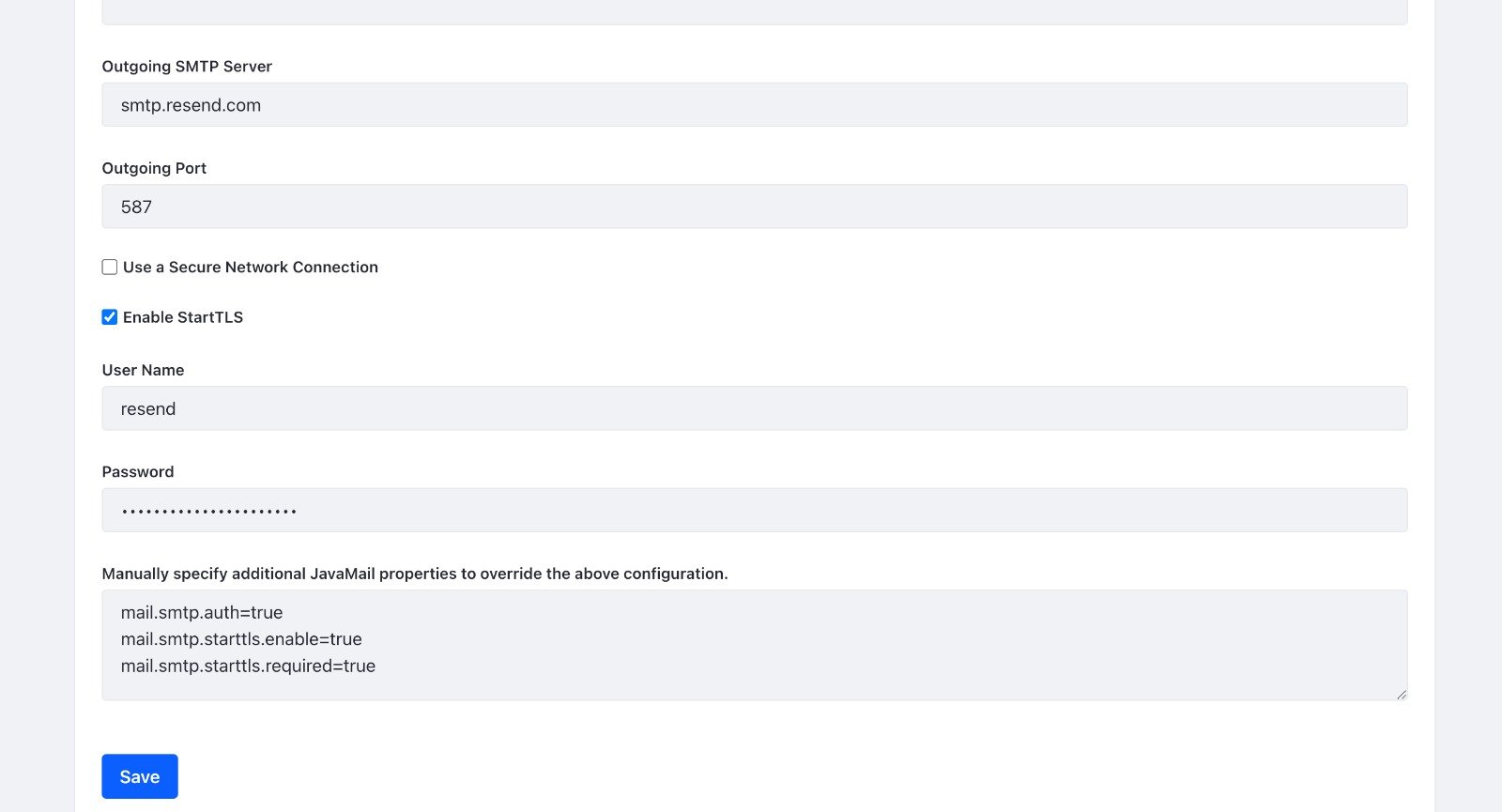
- Copy-and-paste the SMTP credentials from Resend to Liferay.
- Outgoing SMTP Server:
smtp.resend.com - Outgoing Port:
465 - Enable StartTLS:
True - User Name:
resend - Password:
YOUR_API_KEY
Make sure to replace
YOUR_API_KEYwith an existing key or create a new API Key.For the additional JavaMail properties, you can use:
mail.smtp.auth=true
mail.smtp.starttls.enable=true
mail.smtp.starttls.required=true