Managing Segments
Segments are used to group and manage your Contacts. Segments are not visible to your Contacts, but are used for your own internal Contact organization.
Send emails to your Segment
Section titled “Send emails to your Segment”Segments were designed to be used in conjunction with Broadcasts. You can send a Broadcast to an Segment from the Resend dashboard or from the Broadcast API.
From Resend's no-code editor
Section titled “From Resend's no-code editor”You can send emails to your Segment by creating a new Broadcast and selecting the Segment you want to send it to.
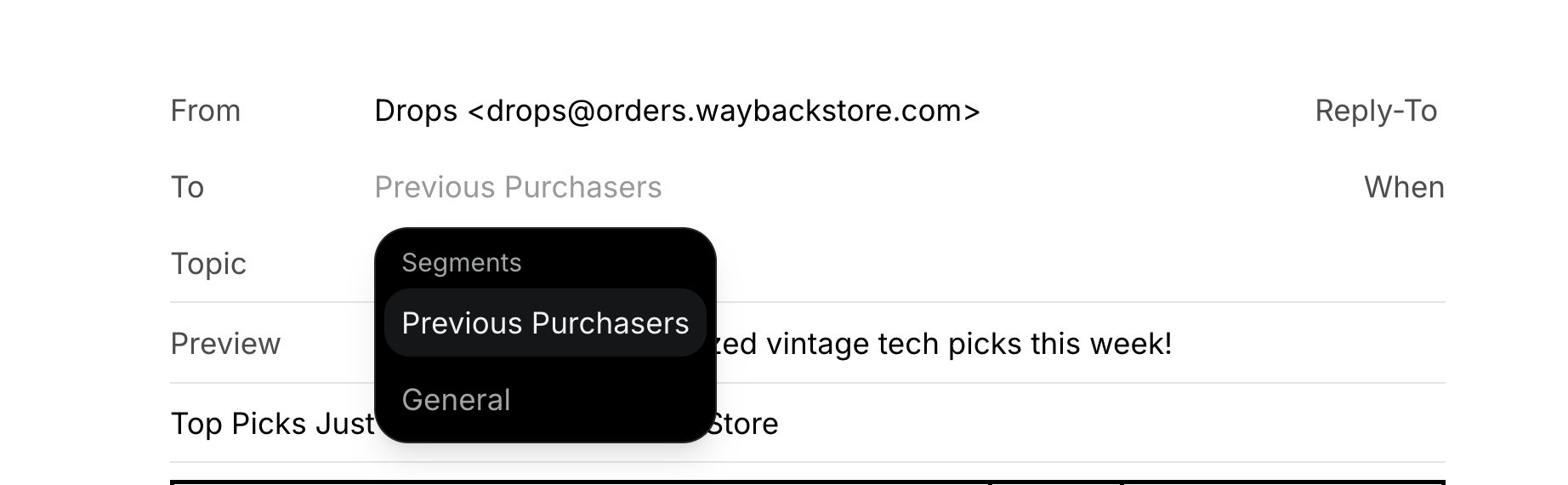
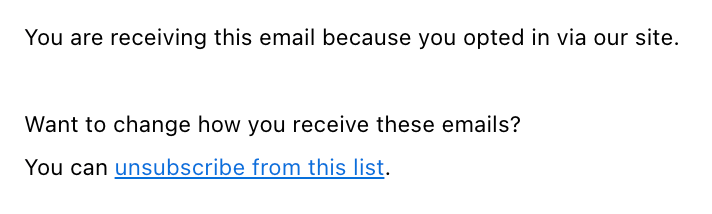
You can include the Unsubscribe Footer in your Broadcasts, which will be automatically replaced with the correct link for each Contact.
From the Broadcast API
Section titled “From the Broadcast API”You can also use our Broadcast API to create and send a Broadcast to your Segment.
import { Resend } from 'resend';

const resend = new Resend('re_xxxxxxxxx');

const { data, error } = await resend.broadcasts.create({
  segmentId: '78261eea-8f8b-4381-83c6-79fa7120f1cf',
  from: 'Acme <onboarding@resend.dev>',
  subject: 'hello world',
  html: 'Hi {{{contact.first_name|there}}}, you can unsubscribe here: {{{RESEND_UNSUBSCRIBE_URL}}}',
});$resend = Resend::client('re_xxxxxxxxx');
$resend->broadcasts->create([
'segment_id' => '78261eea-8f8b-4381-83c6-79fa7120f1cf',
'from' => 'Acme <onboarding@resend.dev>',
'subject' => 'hello world',
'html' => 'Hi {{{contact.first_name|there}}}, you can unsubscribe here: {{{RESEND_UNSUBSCRIBE_URL}}}',
]);import resend
resend.api_key = "re_xxxxxxxxx"
params: resend.Broadcasts.CreateParams = {
"segment_id": "78261eea-8f8b-4381-83c6-79fa7120f1cf",
"from": "Acme <onboarding@resend.dev>",
"subject": "Hello, world!",
"html": "Hi {{{contact.first_name|there}}}, you can unsubscribe here: {{{RESEND_UNSUBSCRIBE_URL}}}",
}
resend.Broadcasts.create(params)require "resend"
Resend.api_key = "re_xxxxxxxxx"
params = {
"segment_id": "78261eea-8f8b-4381-83c6-79fa7120f1cf",
"from": "Acme <onboarding@resend.dev>",
"subject": "hello world",
"html": "Hi {{{contact.first_name|there}}}, you can unsubscribe here: {{{RESEND_UNSUBSCRIBE_URL}}}",
}
Resend::Broadcasts.create(params)import "github.com/resend/resend-go/v4"
client := resend.NewClient("re_xxxxxxxxx")
params := &resend.CreateBroadcastRequest{
SegmentId: "78261eea-8f8b-4381-83c6-79fa7120f1cf",
From: "Acme <onboarding@resend.dev>",
Html: "Hi {{{contact.first_name|there}}}, you can unsubscribe here: {{{RESEND_UNSUBSCRIBE_URL}}}",
Subject: "Hello, world!",
}
client.Broadcasts.Create(params)use resend_rs::{types::CreateBroadcastOptions, Resend, Result};
#[tokio::main]
async fn main() -> Result<()> {
let resend = Resend::new("re_xxxxxxxxx");
let segment_id = "78261eea-8f8b-4381-83c6-79fa7120f1cf";
let from = "Acme <onboarding@resend.dev>";
let subject = "hello world";
let html = "Hi {{{contact.first_name|there}}}, you can unsubscribe here: {{{RESEND_UNSUBSCRIBE_URL}}}";
let opts = CreateBroadcastOptions::new(segment_id, from, subject).with_html(html);
let _broadcast = resend.broadcasts.create(opts).await?;
Ok(())
}import com.resend.*;
import com.resend.services.broadcasts.model.CreateBroadcastOptions;
import com.resend.services.broadcasts.model.CreateBroadcastResponseSuccess;
Resend resend = new Resend("re_xxxxxxxxx");
CreateBroadcastOptions params = CreateBroadcastOptions.builder()
.segmentId("78261eea-8f8b-4381-83c6-79fa7120f1cf")
.from("Acme <onboarding@resend.dev>")
.subject("hello world")
.html("Hi {{{contact.first_name|there}}}, you can unsubscribe here: {{{RESEND_UNSUBSCRIBE_URL}}}")
.build();
CreateBroadcastResponseSuccess data = resend.broadcasts().create(params);using Resend;
IResend resend = ResendClient.Create( "re_xxxxxxxxx" ); // Or from DI
var resp = await resend.BroadcastAddAsync(
new BroadcastData()
{
DisplayName = "Example Broadcast",
SegmentId = new Guid( "78261eea-8f8b-4381-83c6-79fa7120f1cf" ),
From = "Acme <onboarding@resend.dev>",
Subject = "Hello, world!",
HtmlBody = "Hi {{{contact.first_name|there}}}, you can unsubscribe here: {{{RESEND_UNSUBSCRIBE_URL}}}",
}
);
Console.WriteLine( "Broadcast Id={0}", resp.Content );curl -X POST 'https://api.resend.com/broadcasts' \
-H 'Authorization: Bearer re_xxxxxxxxx' \
-H 'Content-Type: application/json' \
-d $'{
"segment_id": "78261eea-8f8b-4381-83c6-79fa7120f1cf",
"from": "Acme <onboarding@resend.dev>",
"subject": "hello world",
"html": "Hi {{{contact.first_name|there}}}, you can unsubscribe here: {{{RESEND_UNSUBSCRIBE_URL}}}"
}'How to customize the unsubscribe link in my Broadcast
Section titled “How to customize the unsubscribe link in my Broadcast”Resend generates a unique link for each recipient and each Broadcast. You can use {{{RESEND_UNSUBSCRIBE_URL}}} as the link target.
Automatic Unsubscribes
Section titled “Automatic Unsubscribes”When you send emails to your Segment, Resend will automatically handle the unsubscribe flow for you.
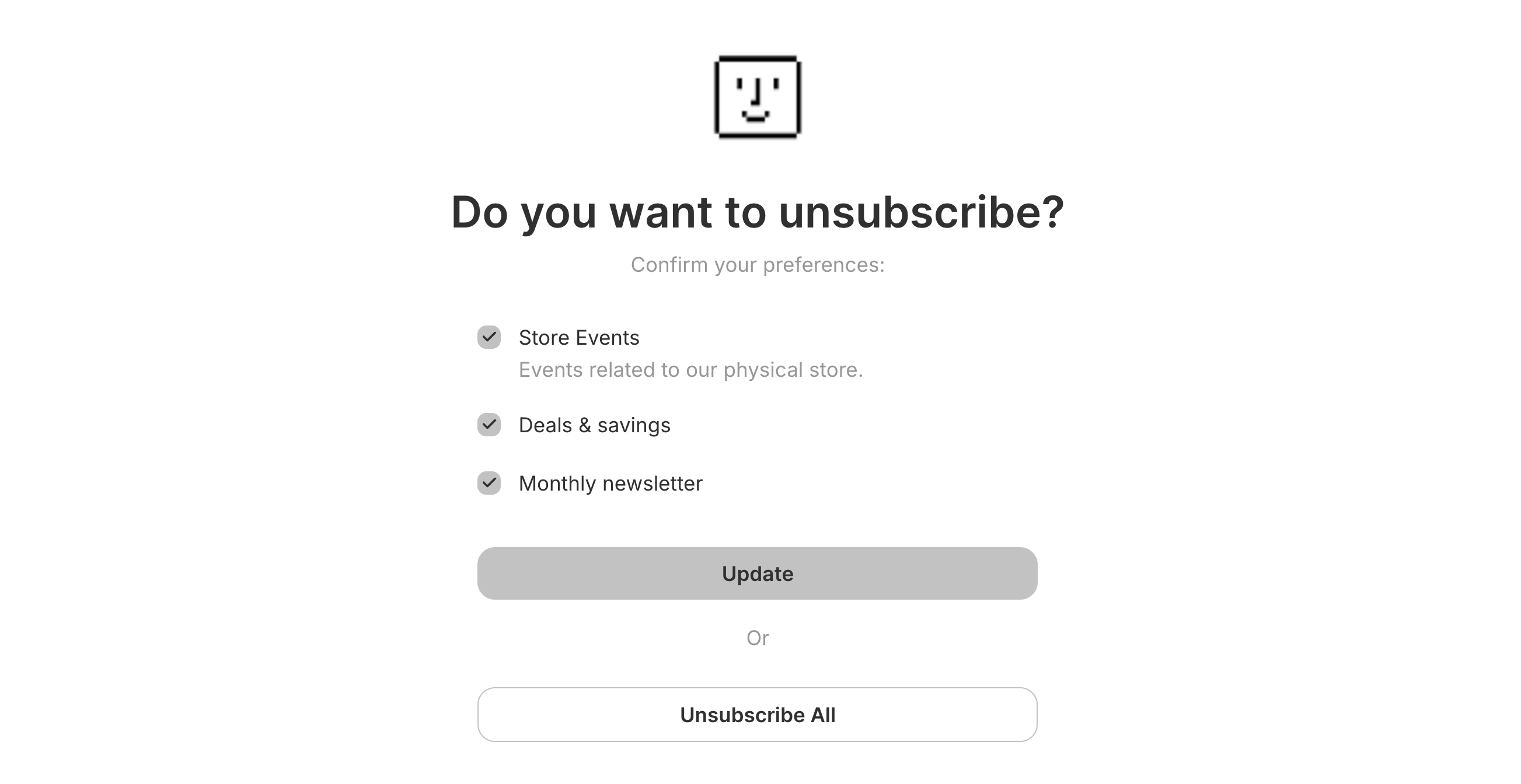
If a Contact unsubscribes from your emails, they will be presented with a preference page.
- If you don't have any Topics configured, the Contact will be unsubscribed from all emails from your account.
- If you have Topics configured, the Contact will be presented with a preference page where they can subscribe or unsubscribe from specific types of emails (all
publicTopics will be shown).
Learn more about managing your unsubscribe list or customizing your unsubscribe page.
Export your data
Section titled “Export your data”Admins can download your data in CSV format for the following resources:
- Emails
- Broadcasts
- Contacts
- Segments
- Domains
- Logs
- API keys
To start, apply filters to your data and click on the "Export" button. Confirm your filters before exporting your data.
If your exported data includes 1,000 items or less, the export will download immediately. For larger exports, you'll receive an email with a link to download your data.
All admins on your team can securely access the export for 7 days. Unavailable exports are marked as "Expired."