Create Automations
The following examples show how to create an automation triggered by the creation of a new user that sends them a welcome email.
Using the dashboard
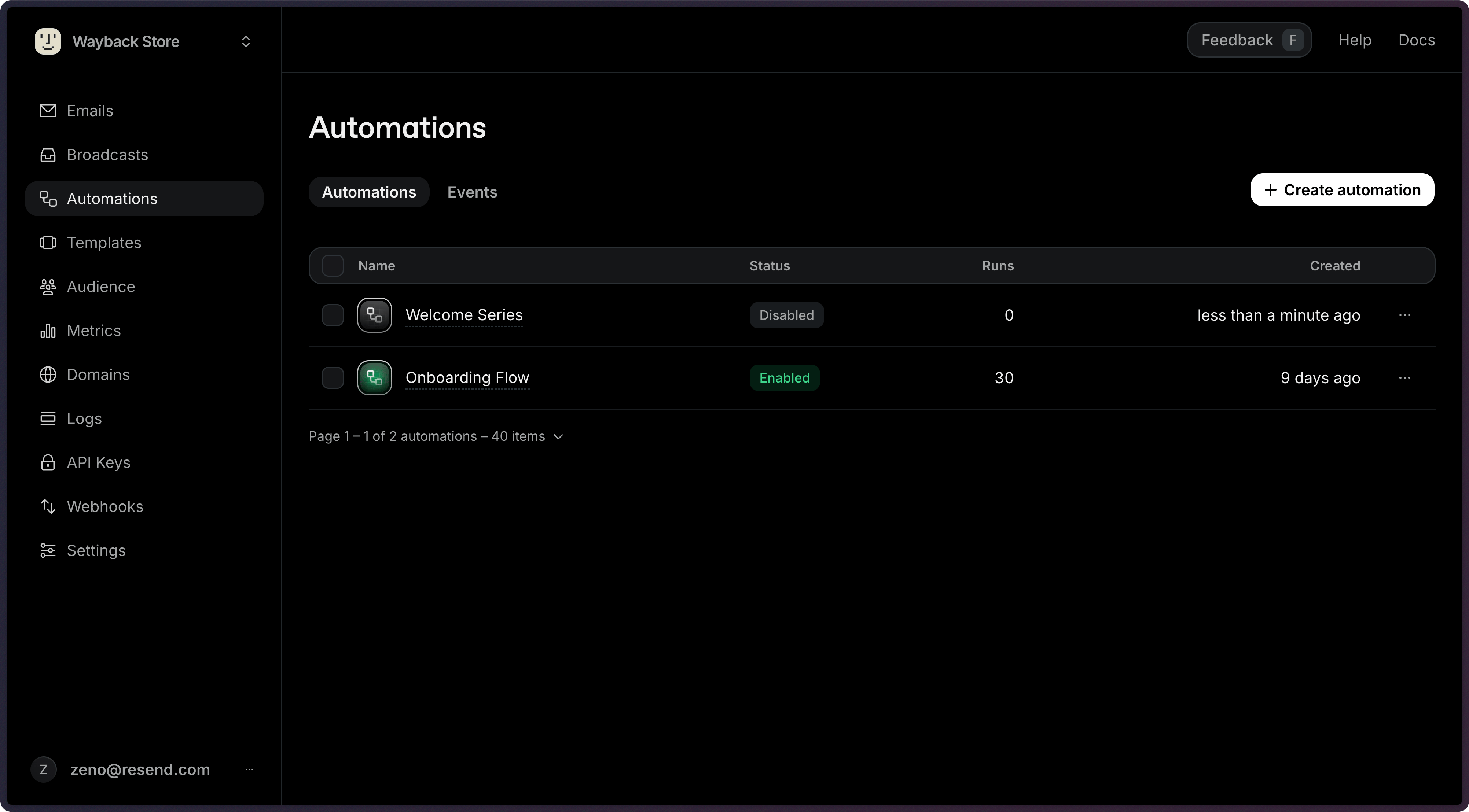
Section titled “Using the dashboard”Click the Create automation button
Add Trigger
A trigger is the first step that will run when the Automation is executed. You can create a new custom trigger event when you create your automation, or select from existing events.
Your existing trigger events are available in the Events tab of the Automation Dashboard page. You can also create new custom events on that page.
Choose a name for your custom event to describe the action that will trigger your automation. A conventional pattern is
entity.action, likeuser.createdoronboarding.completed.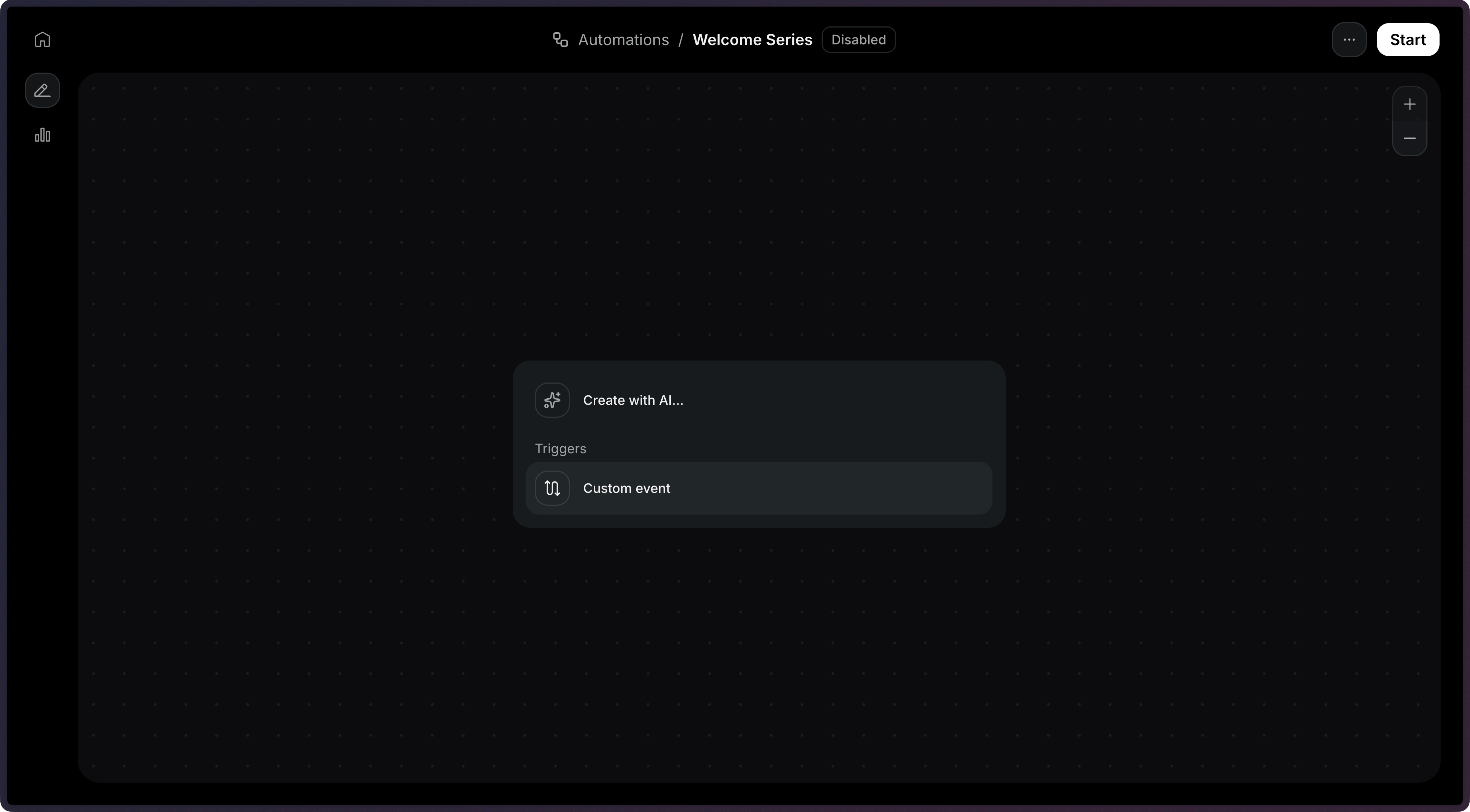
In this example, the application will receive an event called
user.createdas a trigger.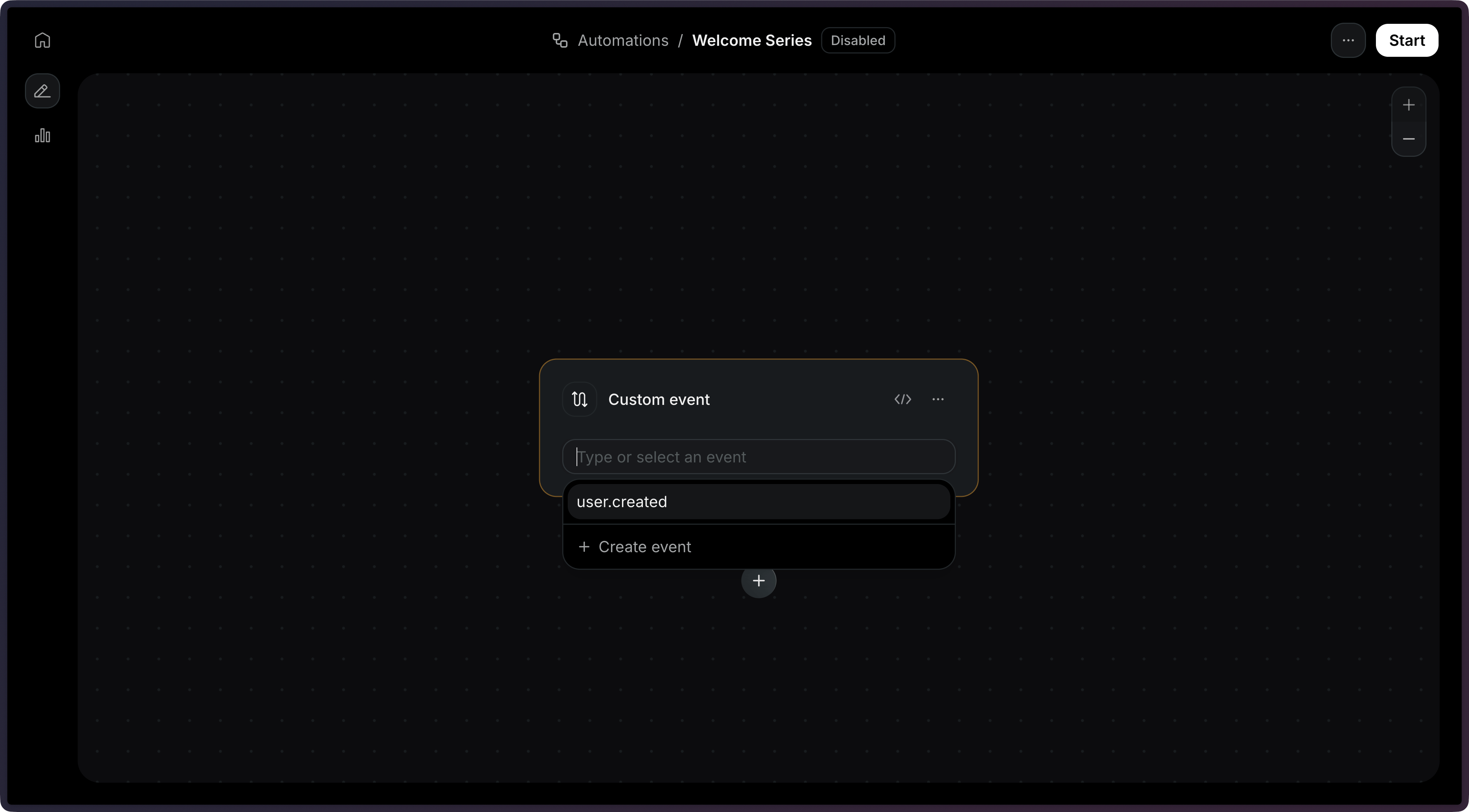
See the Trigger documentation for more details.
Define Steps
Next, define the steps that will be executed when your automation is triggered by a custom event.
There are several step types you can add to your Automation:
Step type Description Condition Branches the workflow based on rules Delay Pauses execution for a specified duration Wait for Event Pauses execution until a specific event is received Send Email Sends an email using a template Contact Update Updates a contact's fields Contact Delete Deletes the contact Add to Segment Adds the contact to a segment This example will send an email when a user is created.
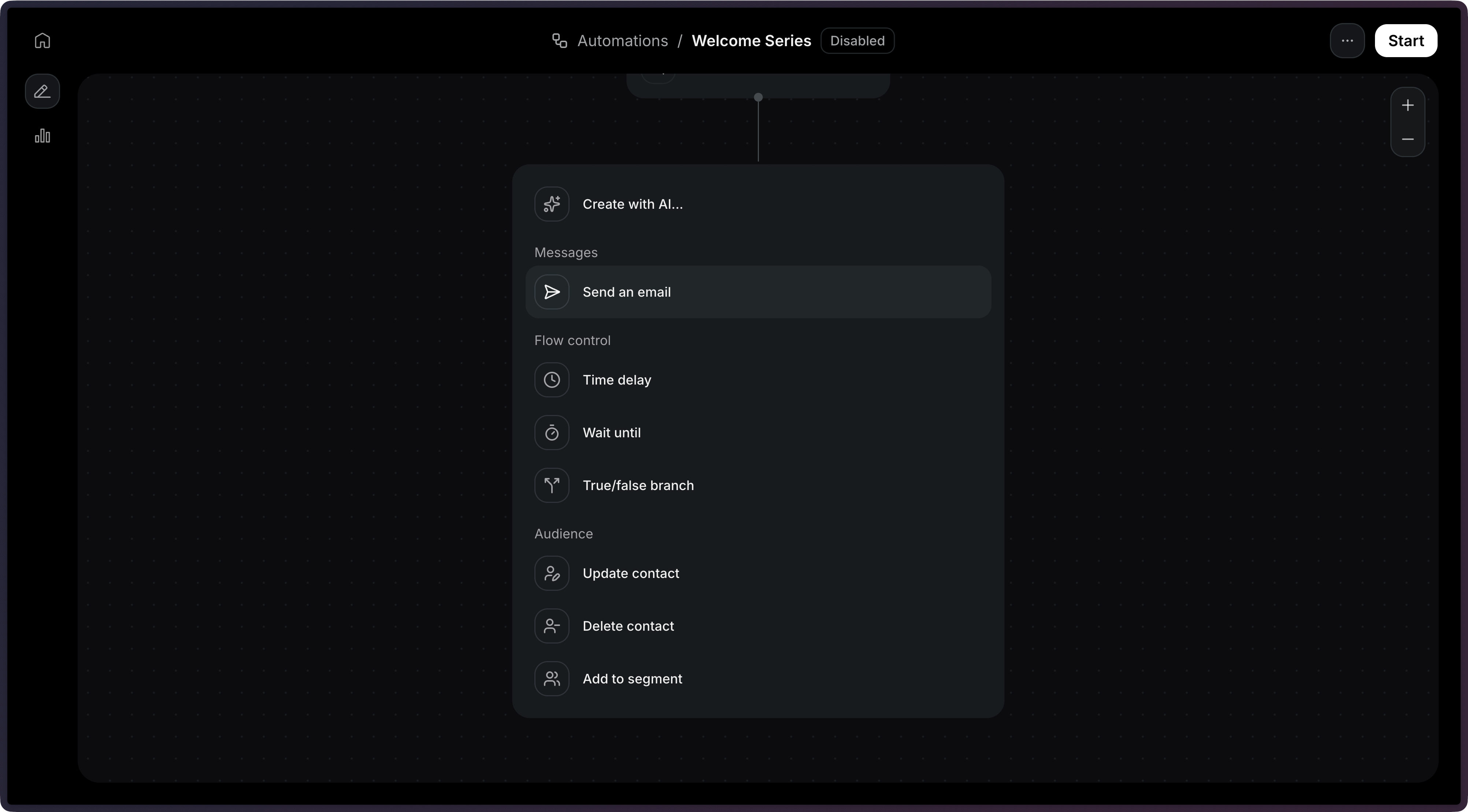
Once you select that step, you will be able to select an existing email Template.
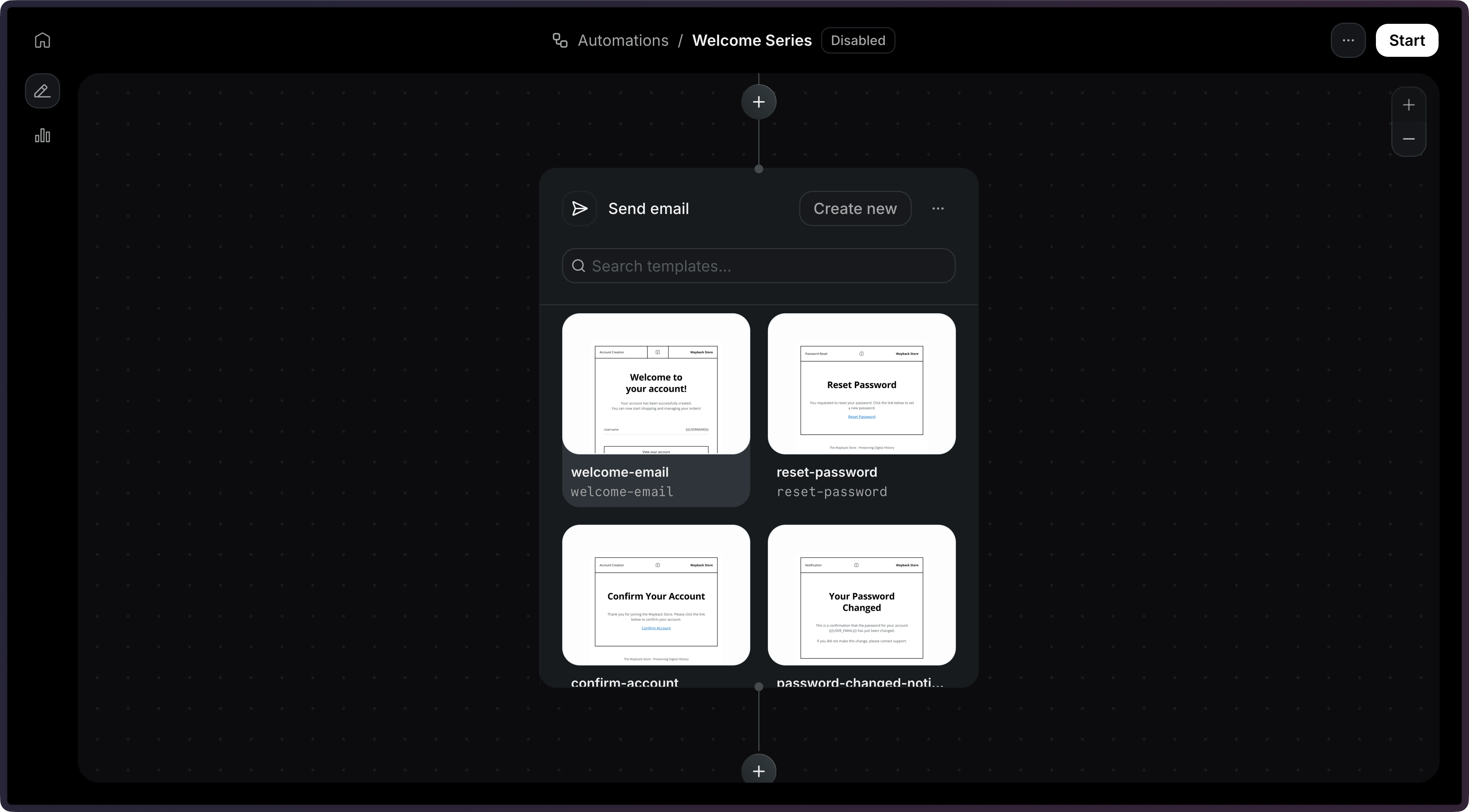
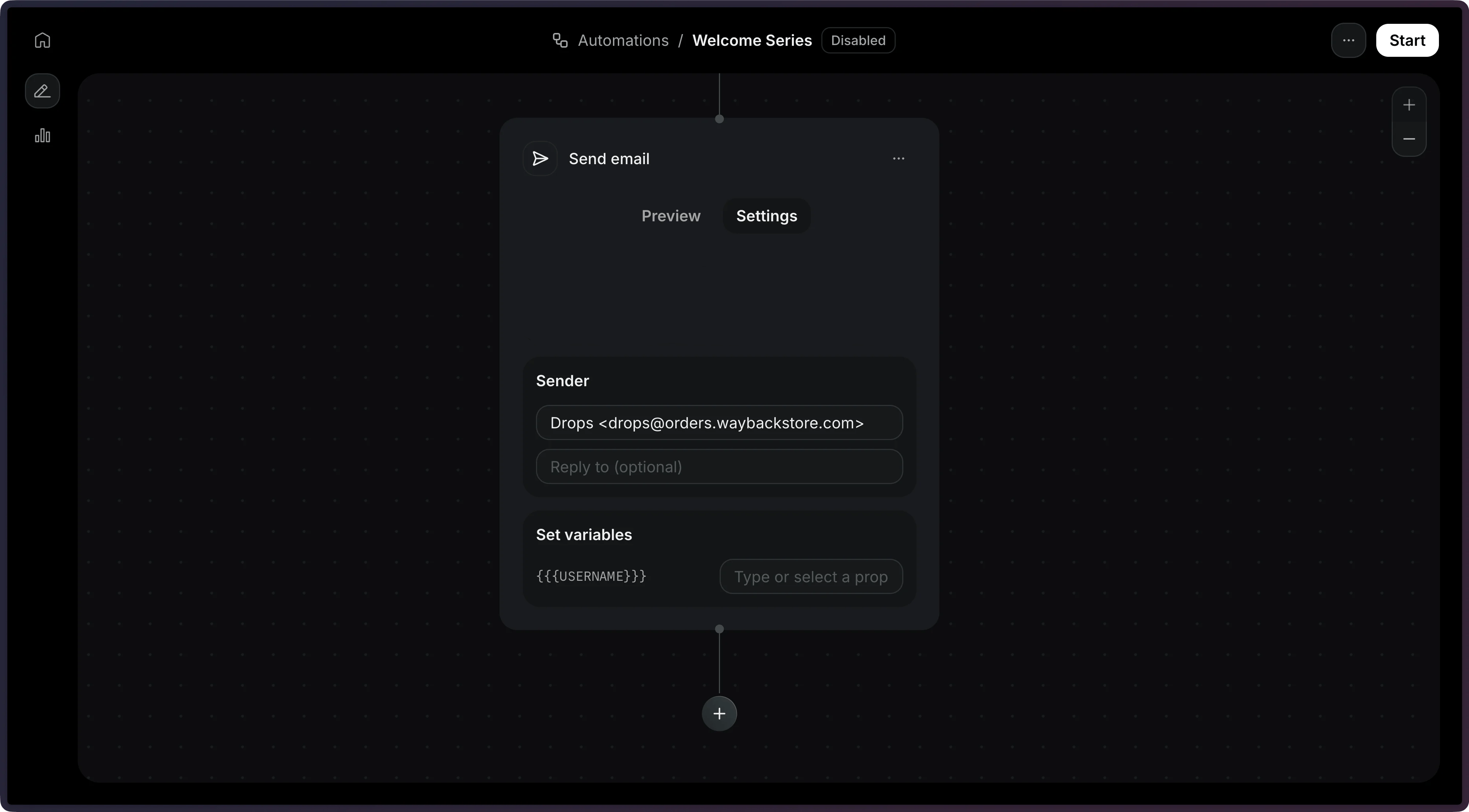
With the Template selected, you will be able to configure the email subject and sender address.
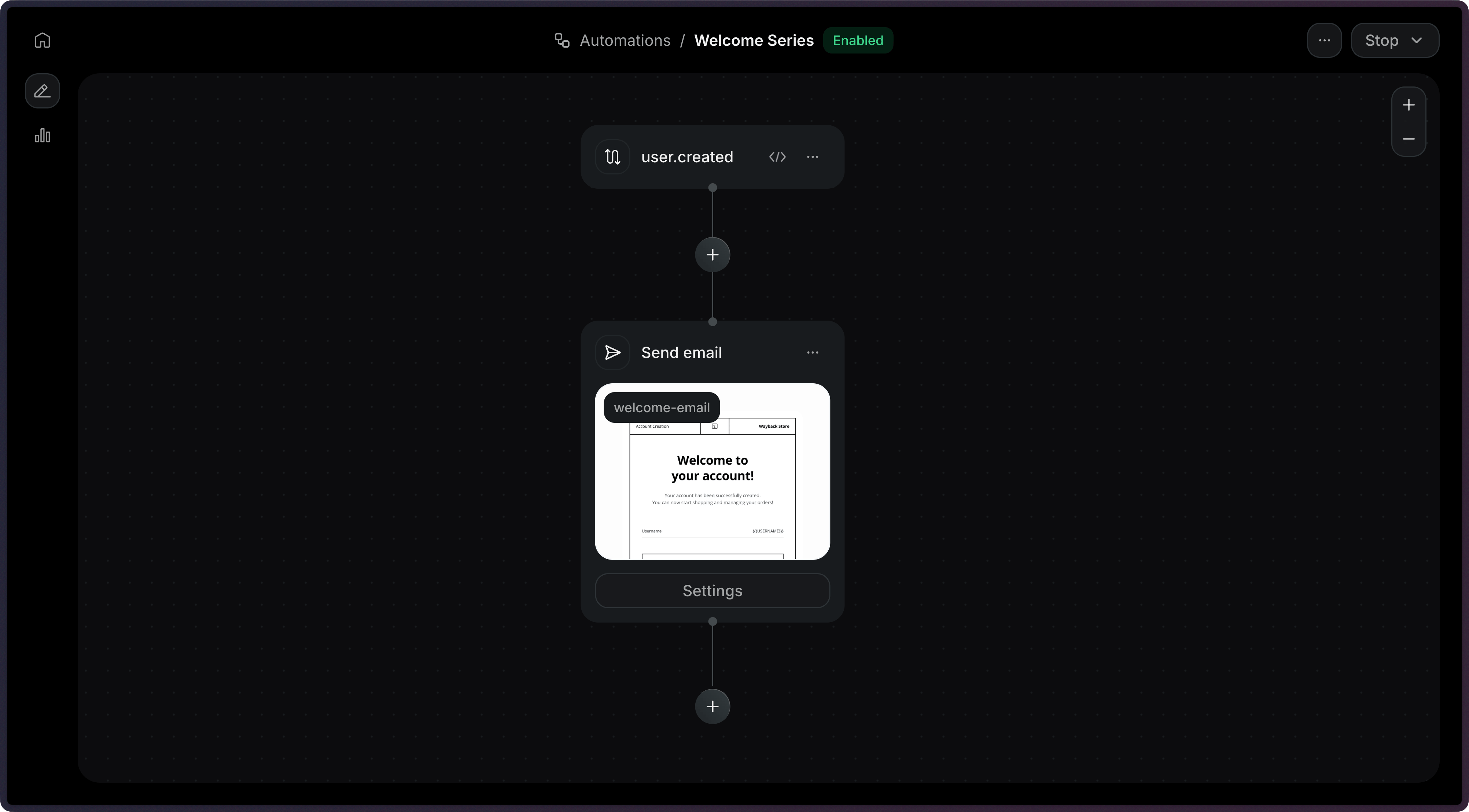
Once you're done with the email, you can click on Start to enable the Automation.
Send an Event
In your application, send an event to trigger the Automation with the Send Event API. Include your custom event name and either
contact_idoremail.You can optionally include a
payloadobject containing custom data to pass to the automation.Node.js import { Resend } from 'resend'; const resend = new Resend('re_xxxxxxxxx'); // Trigger with a contact ID const { data, error } = await resend.events.send({ event: 'user.created', contactId: '7f2e4a3b-dfbc-4e9a-8b2c-5f3a1d6e7c8b', // or: email: 'steve.wozniak@gmail.com', payload: { plan: 'pro', }, });PHP $resend = Resend::client('re_xxxxxxxxx');// Trigger with a contact ID$resend->events->send([ 'event' => 'user.created', 'contact_id' => '7f2e4a3b-dfbc-4e9a-8b2c-5f3a1d6e7c8b', 'payload' => ['plan' => 'pro'],]);// Trigger with an email address$resend->events->send([ 'event' => 'user.created', 'email' => 'steve.wozniak@gmail.com', 'payload' => ['plan' => 'pro'],]);Python import resendresend.api_key = "re_xxxxxxxxx"# Trigger with a contact IDparams: resend.Events.SendParams = { "event": "user.created", "contact_id": "7f2e4a3b-dfbc-4e9a-8b2c-5f3a1d6e7c8b", "payload": { "plan": "pro", },}resend.Events.send(params)# Trigger with an email addressparams: resend.Events.SendParams = { "event": "user.created", "email": "steve.wozniak@gmail.com", "payload": { "plan": "pro", },}resend.Events.send(params)Ruby require "resend"Resend.api_key = "re_xxxxxxxxx"# Trigger with a contact IDparams = { event: "user.created", contact_id: "7f2e4a3b-dfbc-4e9a-8b2c-5f3a1d6e7c8b", payload: { plan: "pro", },}Resend::Events.send(params)# Trigger with an email addressparams = { event: "user.created", email: "steve.wozniak@gmail.com", payload: { plan: "pro", },}Resend::Events.send(params)Go package mainimport "github.com/resend/resend-go/v4"func main() { client := resend.NewClient("re_xxxxxxxxx") // Trigger with a contact ID client.Events.Send(&resend.SendEventRequest{ Event: "user.created", ContactId: "7f2e4a3b-dfbc-4e9a-8b2c-5f3a1d6e7c8b", Payload: map[string]any{ "plan": "pro", }, }) // Trigger with an email address client.Events.Send(&resend.SendEventRequest{ Event: "user.created", Email: "steve.wozniak@gmail.com", Payload: map[string]any{ "plan": "pro", }, })}Rust use resend_rs::{ json, types::{ContactIdOrEmail, SendEventOptions}, Resend, Result,};#[tokio::main]async fn main() -> Result<()> { let resend = Resend::new("re_xxxxxxxxx"); // Trigger with a contact ID let _event = resend .events .send(SendEventOptions { event: "user.created".to_owned(), contact_id_or_email: ContactIdOrEmail::ContactId( "7f2e4a3b-dfbc-4e9a-8b2c-5f3a1d6e7c8b".to_owned(), ), payload: json!({ "plan": "pro" }), }) .await?; // Trigger with an email address let _event = resend .events .send(SendEventOptions { event: "user.created".to_owned(), contact_id_or_email: ContactIdOrEmail::Email("steve.wozniak@gmail.com".to_owned()), payload: json!({ "plan": "pro" }), }) .await?; Ok(())}Java import com.resend.*; import com.resend.core.exception.ResendException; import com.resend.services.events.model.SendEventOptions; import com.resend.services.events.model.SendEventResponseSuccess; public class Main { public static void main(String[] args) throws ResendException { Resend resend = new Resend("re_xxxxxxxxx"); // Trigger with a contact ID SendEventOptions params = SendEventOptions.builder() .event("user.created") .contactId("7f2e4a3b-dfbc-4e9a-8b2c-5f3a1d6e7c8b") .addPayload("plan", "pro") .build(); SendEventResponseSuccess data = resend.events().send(params); // Trigger with an email address SendEventOptions params2 = SendEventOptions.builder() .event("user.created") .email("steve.wozniak@gmail.com") .addPayload("plan", "pro") .build(); SendEventResponseSuccess data2 = resend.events().send(params2); } }.NET using Resend; using System.Text.Json; IResend resend = ResendClient.Create( "re_xxxxxxxxx" ); var payload = JsonSerializer.SerializeToElement( new { plan = "pro" } ); // Trigger with a contact ID var resp = await resend.EventSendAsync( new EventSendData() { Event = "user.created", ContactId = new Guid( "7f2e4a3b-dfbc-4e9a-8b2c-5f3a1d6e7c8b" ), Payload = payload, } ); Console.WriteLine( "Event={0}", resp.Content.Event ); // Trigger with an email address await resend.EventSendAsync( new EventSendData() { Event = "user.created", Email = "steve.wozniak@gmail.com", Payload = payload, } );cURL # Trigger with a contact ID curl -X POST 'https://api.resend.com/events/send' \ -H 'Authorization: Bearer re_xxxxxxxxx' \ -H 'Content-Type: application/json' \ -d '{ "event": "user.created", "contact_id": "7f2e4a3b-dfbc-4e9a-8b2c-5f3a1d6e7c8b", "payload": { "plan": "pro" } }' # Trigger with an email address curl -X POST 'https://api.resend.com/events/send' \ -H 'Authorization: Bearer re_xxxxxxxxx' \ -H 'Content-Type: application/json' \ -d '{ "event": "user.created", "email": "steve.wozniak@gmail.com", "payload": { "plan": "pro" } }'CLI # Trigger with a contact ID resend events send \ --event user.created \ --contact-id 7f2e4a3b-dfbc-4e9a-8b2c-5f3a1d6e7c8b \ --payload '{"plan":"pro"}' # Trigger with an email address resend events send \ --event user.created \ --email steve.wozniak@gmail.com \ --payload '{"plan":"pro"}'View the Send Event API reference for more details.
Monitor Runs
After sending events, you can monitor your Automation executions through Runs. Each time an event triggers an Automation, a Run is created to track the execution.
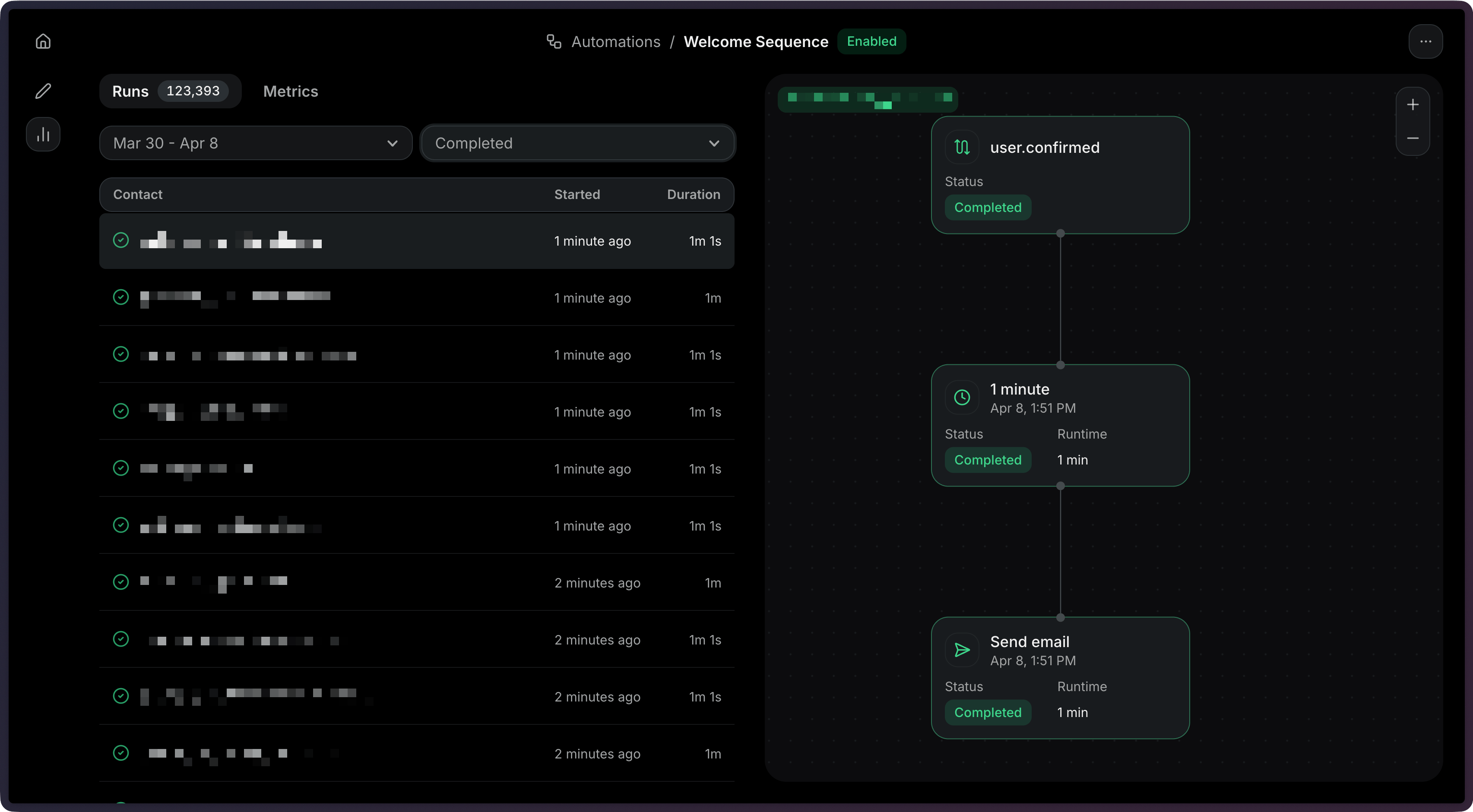
See the Runs documentation to learn how to:
- View Run statuses and execution details
- Filter Runs by status (
running,completed,failed,cancelled) - Debug failed Runs with step-level error information
- Stop Automation Runs when needed
Using the API
Section titled “Using the API”When creating an Automation via the API, you can create an entire Automation flow with a single request.
Define Trigger
You need a custom event to trigger your automation. If you are not using an existing trigger event, you must first create one.
You can create new custom events in the Events tab of the Automation Dashboard page, or using the Create Event API.
Choose a name like
user.createdoronboarding.completedfor your custom event to describe the action that will trigger your automation.Define Automation
The Create Automation API accepts four parameters (status is optional and defaults to
disabled):name: The name of the Automation.status: The status of the Automation.steps: The steps that compose the Automation graph. Use your custom event name as the first item in thestepsarray withtype: 'trigger'.connections: The connections between steps in the Automation graph.
Create Automation
Node.js import { Resend } from 'resend'; const resend = new Resend('re_xxxxxxxxx'); const { data, error } = await resend.automations.create({ name: 'Welcome series', status: 'disabled', steps: [ { key: 'start', type: 'trigger', config: { eventName: 'user.created' }, }, { key: 'welcome', type: 'send_email', config: { template: { id: '34a080c9-b17d-4187-ad80-5af20266e535' }, }, }, ], connections: [{ from: 'start', to: 'welcome' }], });PHP $resend = Resend::client('re_xxxxxxxxx'); $resend->automations->create([ 'name' => 'Welcome series', 'status' => 'disabled', 'steps' => [ [ 'key' => 'start', 'type' => 'trigger', 'config' => ['event_name' => 'user.created'], ], [ 'key' => 'welcome', 'type' => 'send_email', 'config' => [ 'template' => ['id' => '34a080c9-b17d-4187-ad80-5af20266e535'], ], ], ], 'connections' => [['from' => 'start', 'to' => 'welcome']], ]);Python import resend resend.api_key = "re_xxxxxxxxx" params: resend.Automations.CreateParams = { "name": "Welcome series", "status": "disabled", "steps": [ { "key": "start", "type": "trigger", "config": {"event_name": "user.created"}, }, { "key": "welcome", "type": "send_email", "config": { "template": {"id": "34a080c9-b17d-4187-ad80-5af20266e535"}, }, }, ], "connections": [{"from": "start", "to": "welcome"}], } resend.Automations.create(params)Ruby require "resend" Resend.api_key = "re_xxxxxxxxx" params = { name: "Welcome series", status: "disabled", steps: [ { key: "start", type: "trigger", config: { event_name: "user.created" }, }, { key: "welcome", type: "send_email", config: { template: { id: "34a080c9-b17d-4187-ad80-5af20266e535" }, }, }, ], connections: [{ from: "start", to: "welcome" }], } Resend::Automations.create(params)Go package main import "github.com/resend/resend-go/v4" func main() { client := resend.NewClient("re_xxxxxxxxx") params := &resend.CreateAutomationRequest{ Name: "Welcome series", Status: resend.AutomationStatusDisabled, Steps: []resend.AutomationStep{ { Key: "start", Type: resend.AutomationStepTypeTrigger, Config: map[string]any{ "event_name": "user.created", }, }, { Key: "welcome", Type: resend.AutomationStepTypeSendEmail, Config: map[string]any{ "template": map[string]any{ "id": "34a080c9-b17d-4187-ad80-5af20266e535", }, }, }, }, Connections: []resend.AutomationConnection{ {From: "start", To: "welcome"}, }, } client.Automations.Create(params) }Rust use resend_rs::{ types::{ AutomationStatus, AutomationTemplate, Connection, CreateAutomationOptions, SendEmailStepConfig, Step, TriggerStepConfig, }, Resend, Result, }; #[tokio::main] async fn main() -> Result<()> { let resend = Resend::new("re_xxxxxxxxx"); let opts = CreateAutomationOptions { name: "Welcome series".to_owned(), status: AutomationStatus::Disabled, steps: vec![ Step::Trigger { key: "start".to_owned(), config: TriggerStepConfig { event_name: "user.created".to_owned(), }, }, Step::SendEmail { key: "welcome".to_owned(), config: SendEmailStepConfig::new(AutomationTemplate::new( "34a080c9-b17d-4187-ad80-5af20266e535", )), }, ], connections: vec![Connection::new("start", "welcome")], }; let _automation = resend.automations.create(opts).await?; Ok(()) }Java import com.resend.*; import com.resend.core.exception.ResendException; import com.resend.services.automations.model.AutomationConnection; import com.resend.services.automations.model.AutomationStatus; import com.resend.services.automations.model.AutomationStep; import com.resend.services.automations.model.CreateAutomationOptions; import com.resend.services.automations.model.CreateAutomationResponseSuccess; public class Main { public static void main(String[] args) throws ResendException { Resend resend = new Resend("re_xxxxxxxxx"); CreateAutomationOptions options = CreateAutomationOptions.builder() .name("Welcome series") .status(AutomationStatus.DISABLED) .steps( AutomationStep.trigger("start") .eventName("user.created") .build(), AutomationStep.sendEmail("welcome") .template("34a080c9-b17d-4187-ad80-5af20266e535") .build() ) .connections( AutomationConnection.builder() .from("start") .to("welcome") .build() ) .build(); CreateAutomationResponseSuccess response = resend.automations().create(options); } }.NET using Resend; using System.Text.Json; IResend resend = ResendClient.Create( "re_xxxxxxxxx" ); var startConfig = JsonSerializer.SerializeToElement( new { event_name = "user.created" } ); var welcomeConfig = JsonSerializer.SerializeToElement( new { template = new { id = "34a080c9-b17d-4187-ad80-5af20266e535" } } ); var resp = await resend.AutomationCreateAsync( new AutomationCreateData() { Name = "Welcome series", Status = "disabled", Steps = new List<AutomationStepData> { new AutomationStepData { Ref = "start", Type = "trigger", Config = startConfig }, new AutomationStepData { Ref = "welcome", Type = "send_email", Config = welcomeConfig }, }, Connections = new List<AutomationEdge> { new AutomationEdge { From = "start", To = "welcome" }, }, } ); Console.WriteLine( "AutomationId={0}", resp.Content );cURL curl -X POST 'https://api.resend.com/automations' \ -H 'Authorization: Bearer re_xxxxxxxxx' \ -H 'Content-Type: application/json' \ -d '{ "name": "Welcome series", "steps": [ { "key": "start", "type": "trigger", "config": { "event_name": "user.created" } }, { "key": "welcome", "type": "send_email", "config": { "template": { "id": "34a080c9-b17d-4187-ad80-5af20266e535" } } } ], "connections": [ { "from": "start", "to": "welcome" } ] }'CLI resend automations create --name "Welcome series" --file ./automation.jsonFor more help creating an Automation via the API, see the Create Automation API reference.
Send an Event
Trigger the Automation by sending an event from your application.
Node.js import { Resend } from 'resend';const resend = new Resend('re_xxxxxxxxx');// Trigger with a contact IDconst { data, error } = await resend.events.send({ event: 'user.created', contactId: '7f2e4a3b-dfbc-4e9a-8b2c-5f3a1d6e7c8b', // or: email: 'steve.wozniak@gmail.com', payload: { plan: 'pro', },});PHP $resend = Resend::client('re_xxxxxxxxx'); // Trigger with a contact ID $resend->events->send([ 'event' => 'user.created', 'contact_id' => '7f2e4a3b-dfbc-4e9a-8b2c-5f3a1d6e7c8b', 'payload' => ['plan' => 'pro'], ]); // Trigger with an email address $resend->events->send([ 'event' => 'user.created', 'email' => 'steve.wozniak@gmail.com', 'payload' => ['plan' => 'pro'], ]);Python import resend resend.api_key = "re_xxxxxxxxx" # Trigger with a contact ID params: resend.Events.SendParams = { "event": "user.created", "contact_id": "7f2e4a3b-dfbc-4e9a-8b2c-5f3a1d6e7c8b", "payload": { "plan": "pro", }, } resend.Events.send(params) # Trigger with an email address params: resend.Events.SendParams = { "event": "user.created", "email": "steve.wozniak@gmail.com", "payload": { "plan": "pro", }, } resend.Events.send(params)Ruby require "resend" Resend.api_key = "re_xxxxxxxxx" # Trigger with a contact ID params = { event: "user.created", contact_id: "7f2e4a3b-dfbc-4e9a-8b2c-5f3a1d6e7c8b", payload: { plan: "pro", }, } Resend::Events.send(params) # Trigger with an email address params = { event: "user.created", email: "steve.wozniak@gmail.com", payload: { plan: "pro", }, } Resend::Events.send(params)Go package main import "github.com/resend/resend-go/v4" func main() { client := resend.NewClient("re_xxxxxxxxx") // Trigger with a contact ID params := &resend.SendEventRequest{ Event: "user.created", ContactId: "7f2e4a3b-dfbc-4e9a-8b2c-5f3a1d6e7c8b", Payload: map[string]any{ "plan": "pro", }, } client.Events.Send(params) // Trigger with an email address params = &resend.SendEventRequest{ Event: "user.created", Email: "steve.wozniak@gmail.com", Payload: map[string]any{ "plan": "pro", }, } client.Events.Send(params) }Rust use resend_rs::{ json, types::{ContactIdOrEmail, SendEventOptions}, Resend, Result, }; #[tokio::main] async fn main() -> Result<()> { let resend = Resend::new("re_xxxxxxxxx"); let opts = SendEventOptions { event: "user.created".to_owned(), contact_id_or_email: ContactIdOrEmail::ContactId( "7f2e4a3b-dfbc-4e9a-8b2c-5f3a1d6e7c8b".to_owned(), ), // or: ContactIdOrEmail::Email("steve.wozniak@gmail.com".to_owned()) payload: json!({ "plan": "pro" }), }; let _event = resend.events.send(opts).await?; Ok(()) }Java import com.resend.*; import com.resend.core.exception.ResendException; import com.resend.services.events.model.SendEventOptions; import com.resend.services.events.model.SendEventResponseSuccess; public class Main { public static void main(String[] args) throws ResendException { Resend resend = new Resend("re_xxxxxxxxx"); SendEventOptions params = SendEventOptions.builder() .event("user.created") .contactId("7f2e4a3b-dfbc-4e9a-8b2c-5f3a1d6e7c8b") // or: .email("steve.wozniak@gmail.com") .addPayload("plan", "pro") .build(); SendEventResponseSuccess data = resend.events().send(params); } }.NET using Resend; using System.Text.Json; IResend resend = ResendClient.Create( "re_xxxxxxxxx" ); var payload = JsonSerializer.SerializeToElement( new { plan = "pro" } ); // Trigger with a contact ID var resp = await resend.EventSendAsync( new EventSendData() { Event = "user.created", ContactId = new Guid( "7f2e4a3b-dfbc-4e9a-8b2c-5f3a1d6e7c8b" ), Payload = payload, } ); Console.WriteLine( "Event={0}", resp.Content.Event ); // Trigger with an email address await resend.EventSendAsync( new EventSendData() { Event = "user.created", Email = "steve.wozniak@gmail.com", Payload = payload, } );cURL # Trigger with a contact IDcurl -X POST 'https://api.resend.com/events/send' \ -H 'Authorization: Bearer re_xxxxxxxxx' \ -H 'Content-Type: application/json' \ -d '{ "event": "user.created", "contact_id": "7f2e4a3b-dfbc-4e9a-8b2c-5f3a1d6e7c8b", "payload": { "plan": "pro" }}'# Trigger with an email addresscurl -X POST 'https://api.resend.com/events/send' \ -H 'Authorization: Bearer re_xxxxxxxxx' \ -H 'Content-Type: application/json' \ -d '{ "event": "user.created", "email": "steve.wozniak@gmail.com", "payload": { "plan": "pro" }}'CLI # Trigger with a contact ID resend events send \ --event user.created \ --contact-id 7f2e4a3b-dfbc-4e9a-8b2c-5f3a1d6e7c8b \ --payload '{"plan":"pro"}' # Trigger with an email address resend events send \ --event user.created \ --email steve.wozniak@gmail.com \ --payload '{"plan":"pro"}'View the Send Event API reference for more details.
Monitor Runs
After sending events, track your Automation executions through Runs.
Node.js import { Resend } from 'resend'; const resend = new Resend('re_xxxxxxxxx'); const { data, error } = await resend.automations.runs.list({ automationId: 'c9b16d4f-ba6c-4e2e-b044-6bf4404e57fd', });PHP $resend = Resend::client('re_xxxxxxxxx'); $resend->automations->runs->list('c9b16d4f-ba6c-4e2e-b044-6bf4404e57fd');Python import resend resend.api_key = "re_xxxxxxxxx" resend.Automations.Runs.list("c9b16d4f-ba6c-4e2e-b044-6bf4404e57fd")Ruby require "resend" Resend.api_key = "re_xxxxxxxxx" Resend::Automations::Runs.list("c9b16d4f-ba6c-4e2e-b044-6bf4404e57fd")Go package main import "github.com/resend/resend-go/v4" func main() { client := resend.NewClient("re_xxxxxxxxx") client.Automations.ListRuns("c9b16d4f-ba6c-4e2e-b044-6bf4404e57fd") }Rust use resend_rs::{list_opts::ListOptions, Resend, Result}; #[tokio::main] async fn main() -> Result<()> { let resend = Resend::new("re_xxxxxxxxx"); let _automation = resend .automations .list_runs( "c9b16d4f-ba6c-4e2e-b044-6bf4404e57fd", None, ListOptions::default(), ) .await?; Ok(()) }Java import com.resend.*; import com.resend.core.exception.ResendException; import com.resend.services.automations.model.ListAutomationRunsResponseSuccess; public class Main { public static void main(String[] args) throws ResendException { Resend resend = new Resend("re_xxxxxxxxx"); ListAutomationRunsResponseSuccess data = resend.automations().listRuns("c9b16d4f-ba6c-4e2e-b044-6bf4404e57fd"); } }.NET using Resend; IResend resend = ResendClient.Create( "re_xxxxxxxxx" ); var resp = await resend.AutomationRunListAsync( new Guid( "c9b16d4f-ba6c-4e2e-b044-6bf4404e57fd" ) ); Console.WriteLine( "Count={0}", resp.Content.Data.Count );cURL curl -X GET 'https://api.resend.com/automations/c9b16d4f-ba6c-4e2e-b044-6bf4404e57fd/runs' \ -H 'Authorization: Bearer re_xxxxxxxxx'CLI resend automations runs list c9b16d4f-ba6c-4e2e-b044-6bf4404e57fdYou can filter Runs by status (
running,completed,failed,cancelled).See the Runs documentation and List Runs API reference for more details.
API Reference
Section titled “API Reference”For complete API documentation, see the Automations API reference and the Events API reference.