Managing Contacts
Contacts in Resend are global entities linked to a specific email address. After adding Contacts, send Broadcasts to groups of Contacts.
Add Contacts
Section titled “Add Contacts”You can add Contacts one at a time via API or manually, or add many at once by bulk uploading a CSV.
Add Contacts programmatically via API
Section titled “Add Contacts programmatically via API”You can add contacts programmatically using the contacts endpoint.
import { Resend } from 'resend';

const resend = new Resend('re_xxxxxxxxx');

resend.contacts.create({
  email: 'steve.wozniak@gmail.com',
  firstName: 'Steve',
  lastName: 'Wozniak',
});$resend = Resend::client('re_xxxxxxxxx');
$resend->contacts->create(
parameters: [
'email' => 'steve.wozniak@gmail.com',
'first_name' => 'Steve',
'last_name' => 'Wozniak',
]
);import resend
resend.api_key = "re_xxxxxxxxx"
params: resend.Contacts.CreateParams = {
"email": "steve.wozniak@gmail.com",
"first_name": "Steve",
"last_name": "Wozniak",
}
resend.Contacts.create(params)require "resend"
Resend.api_key = "re_xxxxxxxxx"
params = {
"email": "steve.wozniak@gmail.com",
"first_name": "Steve",
"last_name": "Wozniak",
}
Resend::Contacts.create(params)package main
import "github.com/resend/resend-go/v4"
func main() {
client := resend.NewClient("re_xxxxxxxxx")
params := &resend.CreateContactRequest{
Email: "steve.wozniak@gmail.com",
FirstName: "Steve",
LastName: "Wozniak",
Unsubscribed: false,
}
client.Contacts.Create(params)
}use resend_rs::{types::CreateContactOptions, Resend, Result};
#[tokio::main]
async fn main() -> Result<()> {
let resend = Resend::new("re_xxxxxxxxx");
let contact = CreateContactOptions::new("steve.wozniak@gmail.com")
.with_first_name("Steve")
.with_last_name("Wozniak");
let _contact = resend
.contacts
.create(contact)
.await?;
Ok(())
}import com.resend.*;
import com.resend.core.exception.ResendException;
import com.resend.services.contacts.model.CreateContactOptions;
import com.resend.services.contacts.model.CreateContactResponseSuccess;
public class Main {
public static void main(String[] args) throws ResendException {
Resend resend = new Resend("re_xxxxxxxxx");
CreateContactOptions params = CreateContactOptions.builder()
.email("steve.wozniak@gmail.com")
.firstName("Steve")
.lastName("Wozniak")
.build();
CreateContactResponseSuccess data = resend.contacts().create(params);
}
}curl -X POST 'https://api.resend.com/contacts' \
-H 'Authorization: Bearer re_xxxxxxxxx' \
-H 'Content-Type: application/json' \
-d $'{
"email": "steve.wozniak@gmail.com",
"first_name": "Steve",
"last_name": "Wozniak"
}'When creating a Contact, you can optionally set the following properties:
first_name: The first name of the contact.last_name: The last name of the contact.unsubscribed: Whether the contact is unsubscribed from all Broadcasts.properties: A map of custom property keys and values to create (learn more about custom properties).
Once a Contact is created, you can update it using the update contact endpoint or add the contact to a Segment.
Add Contacts by uploading a .csv
Section titled “Add Contacts by uploading a .csv”You can also add Contacts by uploading a .csv file. This is a convenient way to add multiple Contacts at once.
- Go to the Contacts page, and select Add Contacts.
- Select Import CSV.
- Upload your CSV file from your computer.
- Map the fields you want to use. You can map the fields to:
email,first_name,last_name, andunsubscribed, or any Contact properties you've already created. - Optionally add the contacts to an existing Segment.
- Select Continue, review the contacts, and finish the upload.
Add Contacts manually
Section titled “Add Contacts manually”- Go to the Contacts page, and select Add Contacts.
- Select Add Manually.
- Add the email address of the contact in the text field (separated by commas or new lines for multiple contacts).
- Optionally add the contact to an existing Segment.
- Confirm and click Add.
Bulk upload by CSV
Section titled “Bulk upload by CSV”You can add many Contacts at once by uploading a CSV file (up to 200MB), either from the dashboard or programmatically.
From the dashboard
Section titled “From the dashboard”- Go to the Contacts page, and select Add Contacts.
- Select Import CSV.
- Drag and drop or click to upload your CSV file from your computer.
- Resend uses AI to read your column headers and suggest field mappings. Review and adjust the mappings to
email,first_name,last_name, andunsubscribed, or to any existing Contact properties. You can also map a column to a new custom property and Resend will create it for you. Use the checkboxes to include or exclude individual columns. Theemailcolumn is always included. - Optionally add the contacts to an existing Segment.
- Select Continue, review the contacts, and finish the upload.
Using the API, CLI, or MCP
Section titled “Using the API, CLI, or MCP”You can also create and track imports programmatically with the Contacts Import API and SDKs, the CLI, or the MCP server. These support the same column mapping and let you set on_conflict to upsert (update existing Contacts) or skip (leave them untouched).
Contact Properties
Section titled “Contact Properties”Contact Properties can be used to store additional information about your Contacts and then personalize your Broadcasts.
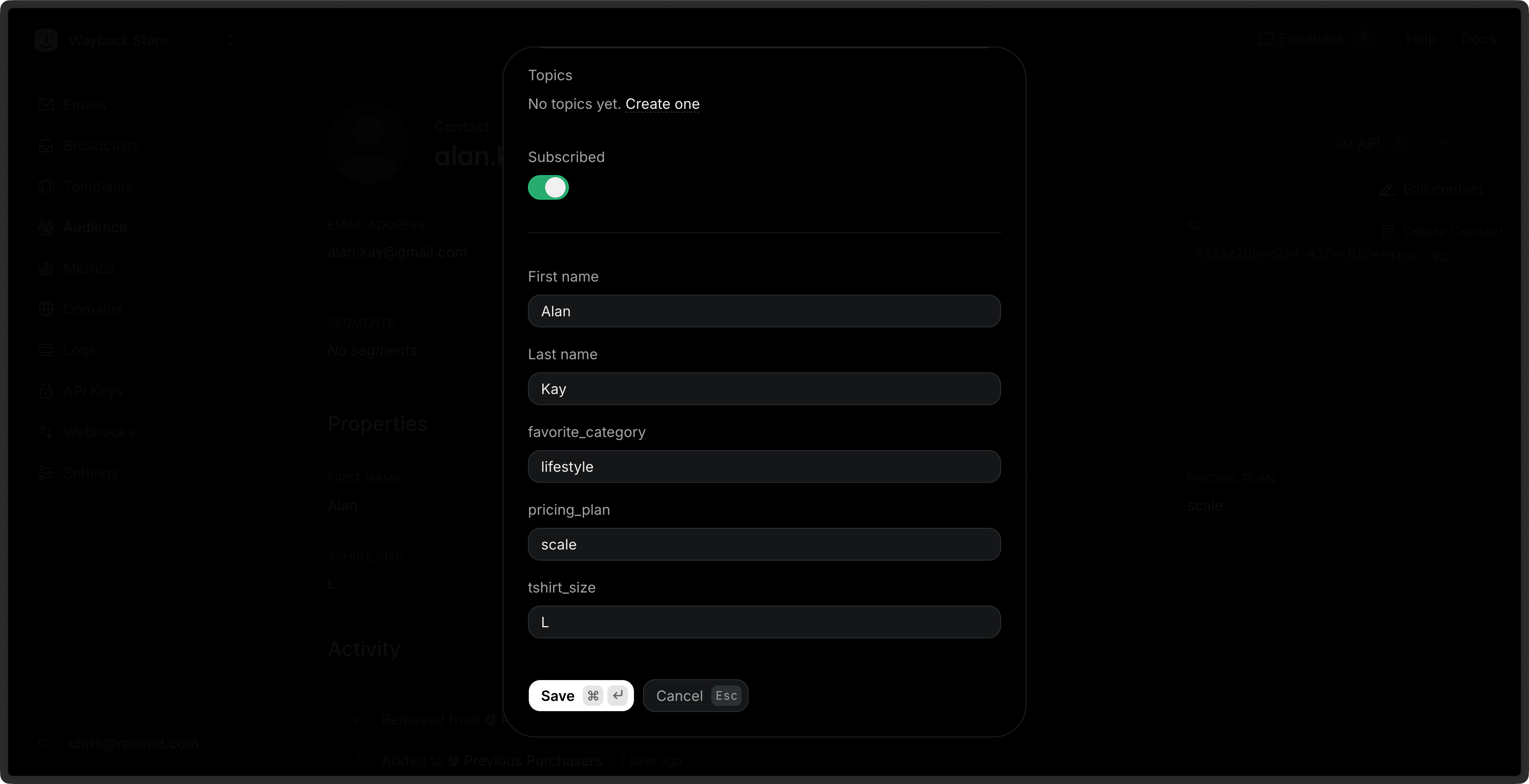
Resend includes a few default properties:
first_name: The first name of the contact.last_name: The last name of the contact.unsubscribed: Whether the contact is unsubscribed from all Broadcasts.email: The email address of the contact.
You can create additional custom Contact Properties for your Contacts to store additional information. These properties can be used to personalize your Broadcasts across all Segments.
Learn more about Contact Properties.
View Contacts
Section titled “View Contacts”You can view your Contacts in the Contacts page.
- Go to the Contacts page.
- Click on the Contact you want to view.
- View the Contact details.
Each Contact includes the metadata associated with the contact, as well as a full history of all marketing interactions with the Contact.
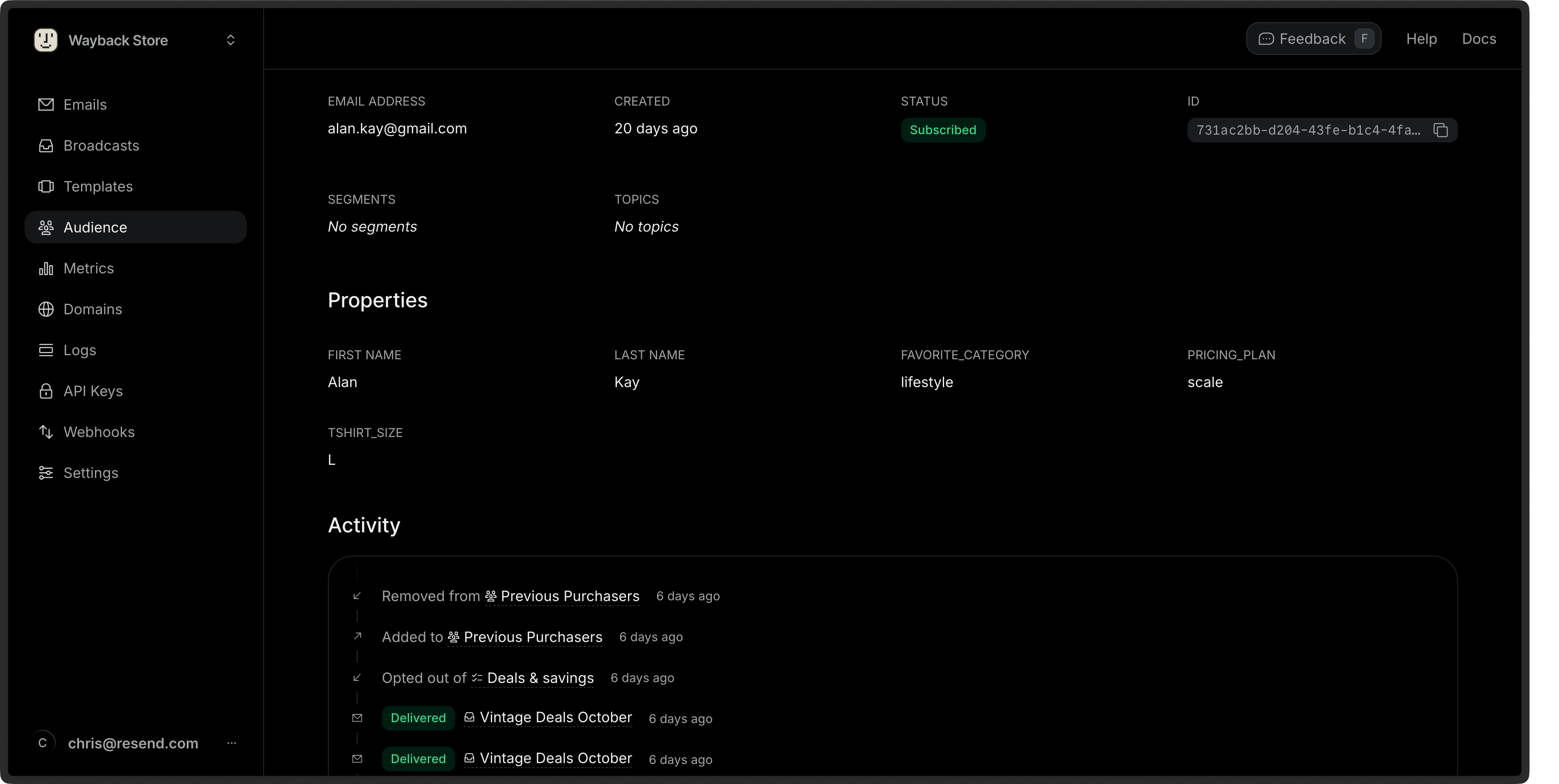
You can also retrieve a single Contact or list all Contacts via the API or SDKs.
Edit Contacts
Section titled “Edit Contacts”- Go to the Contacts page.
- Click on the More options button and then Edit Contact.
- Edit the Contact details and choose Save.
You can edit any Contact property (excluding the email address), assign the Contact to a Segment or Topic, or unsubscribe the Contact from all Broadcasts.
You can also update a Contact via the API or SDKs using the id or email of the Contact.
import { Resend } from 'resend';

const resend = new Resend('re_xxxxxxxxx');

const { data, error } = await resend.contacts.update({
  id: 'e169aa45-1ecf-4183-9955-b1499d5701d3',
  // or: email: 'acme@example.com',
  unsubscribed: true,
});$resend = Resend::client('re_xxxxxxxxx');
// Update by contact id
$resend->contacts->update(
idOrEmail: 'e169aa45-1ecf-4183-9955-b1499d5701d3',
parameters: [
'unsubscribed' => true
]
);
// Update by contact email
$resend->contacts->update(
idOrEmail: 'acme@example.com',
parameters: [
'unsubscribed' => true
]
);import resend
resend.api_key = "re_xxxxxxxxx"
# Update by contact id
params: resend.Contacts.UpdateParams = {
"id": "e169aa45-1ecf-4183-9955-b1499d5701d3",
"unsubscribed": True,
}
resend.Contacts.update(params)
# Update by contact email
params: resend.Contacts.UpdateParams = {
"email": "acme@example.com",
"unsubscribed": True,
}
resend.Contacts.update(params)require "resend"
Resend.api_key = "re_xxxxxxxxx"
# Update by contact id
params = {
"id": "e169aa45-1ecf-4183-9955-b1499d5701d3",
"unsubscribed": true,
}
Resend::Contacts.update(params)
# Update by contact email
params = {
"email": "acme@example.com",
"unsubscribed": true,
}
Resend::Contacts.update(params)import "github.com/resend/resend-go/v4"
client := resend.NewClient("re_xxxxxxxxx")
// Update by contact id
params := &resend.UpdateContactRequest{
Id: "e169aa45-1ecf-4183-9955-b1499d5701d3",
Unsubscribed: true,
}
params.SetUnsubscribed(true)
client.Contacts.Update(params)
// Update by contact email
params = &resend.UpdateContactRequest{
Email: "acme@example.com",
Unsubscribed: true,
}
params.SetUnsubscribed(true)
client.Contacts.Update(params)use resend_rs::{types::ContactChanges, Resend, Result};
#[tokio::main]
async fn main() -> Result<()> {
let resend = Resend::new("re_xxxxxxxxx");
let changes = ContactChanges::new().with_unsubscribed(true);
// Update by contact id
let _contact = resend
.contacts
.update("e169aa45-1ecf-4183-9955-b1499d5701d3", changes.clone())
.await?;
// Update by contact email
let _contact = resend
.contacts
.update("acme@example.com", changes)
.await?;
Ok(())
}import com.resend.*;
import com.resend.core.exception.ResendException;
import com.resend.services.contacts.model.UpdateContactOptions;
import com.resend.services.contacts.model.UpdateContactResponseSuccess;
public class Main {
public static void main(String[] args) throws ResendException {
Resend resend = new Resend("re_xxxxxxxxx");
UpdateContactOptions params = UpdateContactOptions.builder()
.id("e169aa45-1ecf-4183-9955-b1499d5701d3") // or: .email("acme@example.com")
.unsubscribed(true)
.build();
UpdateContactResponseSuccess data = resend.contacts().update(params);
}
}using Resend;
IResend resend = ResendClient.Create( "re_xxxxxxxxx" ); // Or from DI
// By Id
await resend.ContactUpdateAsync(
contactId: new Guid( "e169aa45-1ecf-4183-9955-b1499d5701d3" ),
new ContactData()
{
FirstName = "Stevie",
LastName = "Wozniaks",
IsUnsubscribed = true,
}
);
// By Email
await resend.ContactUpdateByEmailAsync(
"acme@example.com",
new ContactData()
{
FirstName = "Stevie",
LastName = "Wozniaks",
IsUnsubscribed = true,
}
);# Update by contact id
curl -X PATCH 'https://api.resend.com/contacts/520784e2-887d-4c25-b53c-4ad46ad38100' \
-H 'Authorization: Bearer re_xxxxxxxxx' \
-H 'Content-Type: application/json' \
-d $'{
"unsubscribed": true
}'
# Update by contact email
curl -X PATCH 'https://api.resend.com/contacts/acme@example.com' \
-H 'Authorization: Bearer re_xxxxxxxxx' \
-H 'Content-Type: application/json' \
-d $'{
"unsubscribed": true
}'Bulk Actions
Section titled “Bulk Actions”You can perform actions on multiple Contacts at once by selecting them from the Contacts page.
- Go to the Contacts page.
- Select multiple Contacts by clicking the checkbox next to each Contact.
- Click the Edit button in the bulk actions bar.
- Choose an action:
- Add to segments: Add the selected Contacts to one or more Segments.
- Subscribe to topics: Subscribe the selected Contacts to one or more Topics.
You can also delete multiple Contacts at once by clicking the Delete button in the bulk actions bar.
Delete Contacts
Section titled “Delete Contacts”- Go to the Contacts page.
- Click on the More options button and then Delete Contact.
- Confirm the deletion.
You can also delete a Contact via the API or SDKs.
import { Resend } from 'resend';

const resend = new Resend('re_xxxxxxxxx');

const { data, error } = await resend.contacts.remove({
  id: '520784e2-887d-4c25-b53c-4ad46ad38100',
  // or: email: 'acme@example.com',
});$resend = Resend::client('re_xxxxxxxxx');
// Delete by contact id
$resend->contacts->remove(
idOrEmail: '520784e2-887d-4c25-b53c-4ad46ad38100'
);
// Delete by contact email
$resend->contacts->remove(
idOrEmail: 'acme@example.com'
);import resend
resend.api_key = "re_xxxxxxxxx"
# Delete by contact id
resend.Contacts.remove(
id="520784e2-887d-4c25-b53c-4ad46ad38100"
)
# Delete by contact email
resend.Contacts.remove(
email="acme@example.com"
)require "resend"
Resend.api_key = "re_xxxxxxxxx"
# Delete by contact id
Resend::Contacts.remove(
id: "520784e2-887d-4c25-b53c-4ad46ad38100"
)
# Delete by contact email
Resend::Contacts.remove(
email: "acme@example.com",
)import "github.com/resend/resend-go/v4"
client := resend.NewClient("re_xxxxxxxxx")
// Delete by contact id
client.Contacts.Remove(&resend.RemoveContactOptions{
Id: "520784e2-887d-4c25-b53c-4ad46ad38100",
})
// Delete by contact email
client.Contacts.Remove(&resend.RemoveContactOptions{
Id: "acme@example.com",
})use resend_rs::{Resend, Result};
#[tokio::main]
async fn main() -> Result<()> {
let resend = Resend::new("re_xxxxxxxxx");
// Delete by contact id
let _deleted = resend
.contacts
.delete("520784e2-887d-4c25-b53c-4ad46ad38100")
.await?;
// Delete by contact email
let _deleted = resend
.contacts
.delete("acme@example.com")
.await?;
Ok(())
}import com.resend.*;
import com.resend.core.exception.ResendException;
import com.resend.services.contacts.model.RemoveContactOptions;
public class Main {
public static void main(String[] args) throws ResendException {
Resend resend = new Resend("re_xxxxxxxxx");
// Delete by contact id
resend.contacts().remove(RemoveContactOptions.builder()
.id("520784e2-887d-4c25-b53c-4ad46ad38100")
.build());
// Delete by contact email
resend.contacts().remove(RemoveContactOptions.builder()
.email("acme@example.com")
.build());
}
}using Resend;
IResend resend = ResendClient.Create( "re_xxxxxxxxx" ); // Or from DI
// By Id
await resend.ContactDeleteAsync(
contactId: new Guid( "520784e2-887d-4c25-b53c-4ad46ad38100" )
);
// By Email
await resend.ContactDeleteByEmailAsync(
"acme@example.com"
);# Delete by contact id
curl -X DELETE 'https://api.resend.com/contacts/520784e2-887d-4c25-b53c-4ad46ad38100' \
-H 'Authorization: Bearer re_xxxxxxxxx'
# Deleted by contact email
curl -X DELETE 'https://api.resend.com/contacts/acme@example.com' \
-H 'Authorization: Bearer re_xxxxxxxxx'