Runs
Every time an event triggers an Automation, Resend creates a run.
A run tracks the execution of each step in the workflow, including its status and timing, along with any errors.
How it works
Section titled “How it works”Each run has one of the following statuses:
| Status | Description |
|---|---|
running |
The Automation is executing steps |
completed |
All steps finished successfully |
failed |
A step encountered an error and the run stopped |
cancelled |
The run was cancelled before completing |
skipped |
A step was skipped because the contact has either unsubscribed or followed a different branch path |
Skipped steps
Section titled “Skipped steps”When a contact unsubscribes, any remaining Send Email steps in the Automation will be skipped automatically. Other step types (such as Delay, Condition, or Update Contact) will still be executed as normal.
Listing runs
Section titled “Listing runs”Navigate to the Automations page and select an Automation to view its runs.
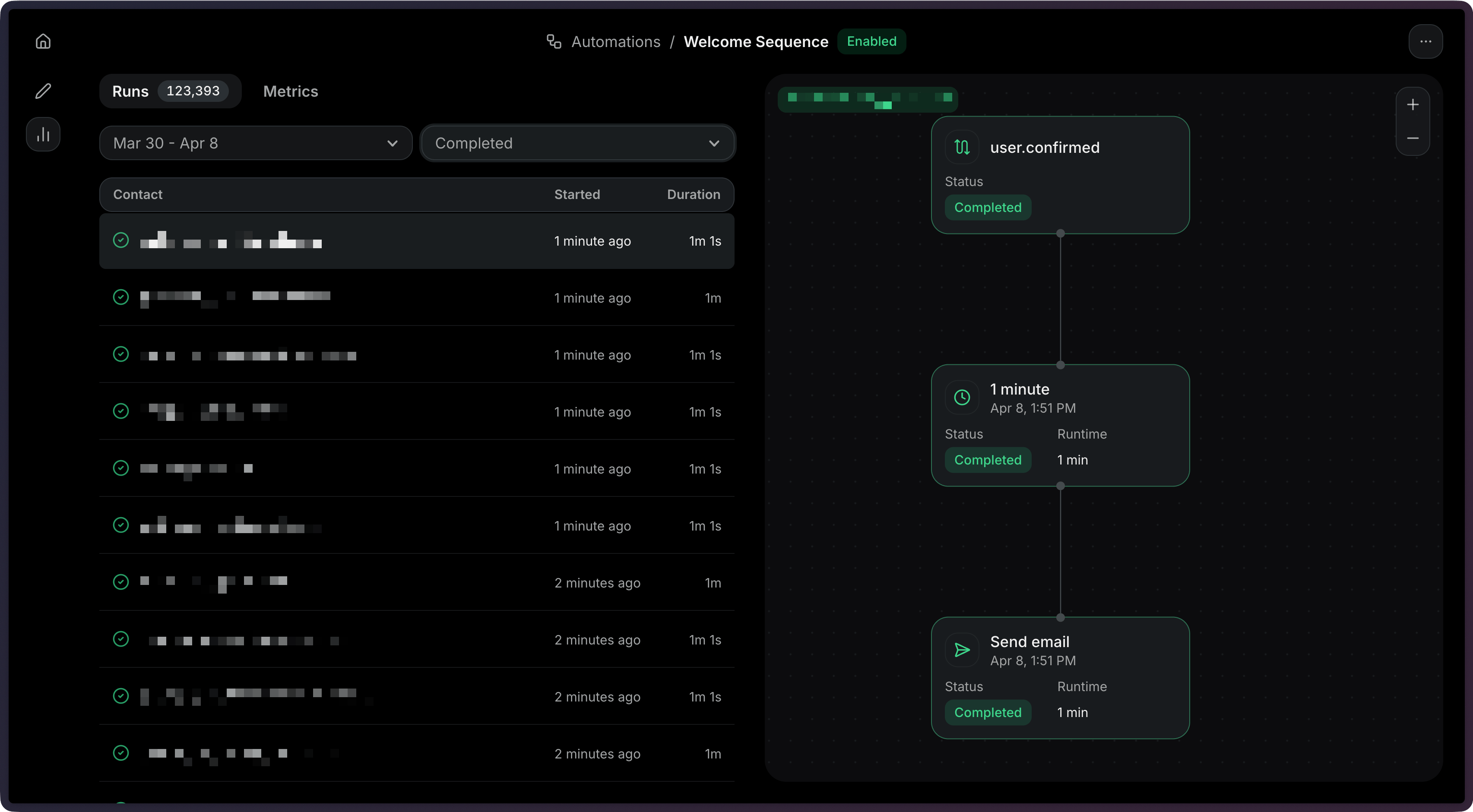
Each run shows:
- Status — Whether the run is
running,completed,failed,cancelled, orskipped. - Started — When the run began.
- Duration — When the run finished (if applicable).
List all runs for an Automation:
import { Resend } from 'resend';

const resend = new Resend('re_xxxxxxxxx');

const { data, error } = await resend.automations.runs.list({
  automationId: 'c9b16d4f-ba6c-4e2e-b044-6bf4404e57fd',
});$resend = Resend::client('re_xxxxxxxxx');
$resend->automations->runs->list('c9b16d4f-ba6c-4e2e-b044-6bf4404e57fd');import resend
resend.api_key = "re_xxxxxxxxx"
resend.Automations.Runs.list("c9b16d4f-ba6c-4e2e-b044-6bf4404e57fd")require "resend"
Resend.api_key = "re_xxxxxxxxx"
Resend::Automations::Runs.list("c9b16d4f-ba6c-4e2e-b044-6bf4404e57fd")package main
import "github.com/resend/resend-go/v4"
func main() {
client := resend.NewClient("re_xxxxxxxxx")
client.Automations.ListRuns("c9b16d4f-ba6c-4e2e-b044-6bf4404e57fd")
}use resend_rs::{list_opts::ListOptions, Resend, Result};
#[tokio::main]
async fn main() -> Result<()> {
let resend = Resend::new("re_xxxxxxxxx");
let _runs = resend
.automations
.list_runs(
"c9b16d4f-ba6c-4e2e-b044-6bf4404e57fd",
None,
ListOptions::default(),
)
.await?;
Ok(())
}import com.resend.*;
import com.resend.core.exception.ResendException;
import com.resend.services.automations.model.ListAutomationRunsResponseSuccess;
public class Main {
public static void main(String[] args) throws ResendException {
Resend resend = new Resend("re_xxxxxxxxx");
ListAutomationRunsResponseSuccess data = resend.automations().listRuns("c9b16d4f-ba6c-4e2e-b044-6bf4404e57fd");
}
}using Resend;
IResend resend = ResendClient.Create( "re_xxxxxxxxx" );
var resp = await resend.AutomationRunListAsync( new Guid( "c9b16d4f-ba6c-4e2e-b044-6bf4404e57fd" ) );
Console.WriteLine( "Count={0}", resp.Content.Data.Count );curl -X GET 'https://api.resend.com/automations/c9b16d4f-ba6c-4e2e-b044-6bf4404e57fd/runs' \
-H 'Authorization: Bearer re_xxxxxxxxx'resend automations runs list c9b16d4f-ba6c-4e2e-b044-6bf4404e57fdResponse:
{
  "object": "list",
  "has_more": false,
  "data": [
    {
      "id": "a1b2c3d4-e5f6-7890-abcd-ef1234567890",
      "status": "completed",
      "started_at": "2026-10-01 12:00:00.000000+00",
      "completed_at": "2026-10-01 12:05:00.000000+00",
      "created_at": "2026-10-01 12:00:00.000000+00"
    }
  ]
}
View the List Automation Runs API reference for more details.
Filtering runs by status
Section titled “Filtering runs by status”You can filter runs by status to find specific executions.
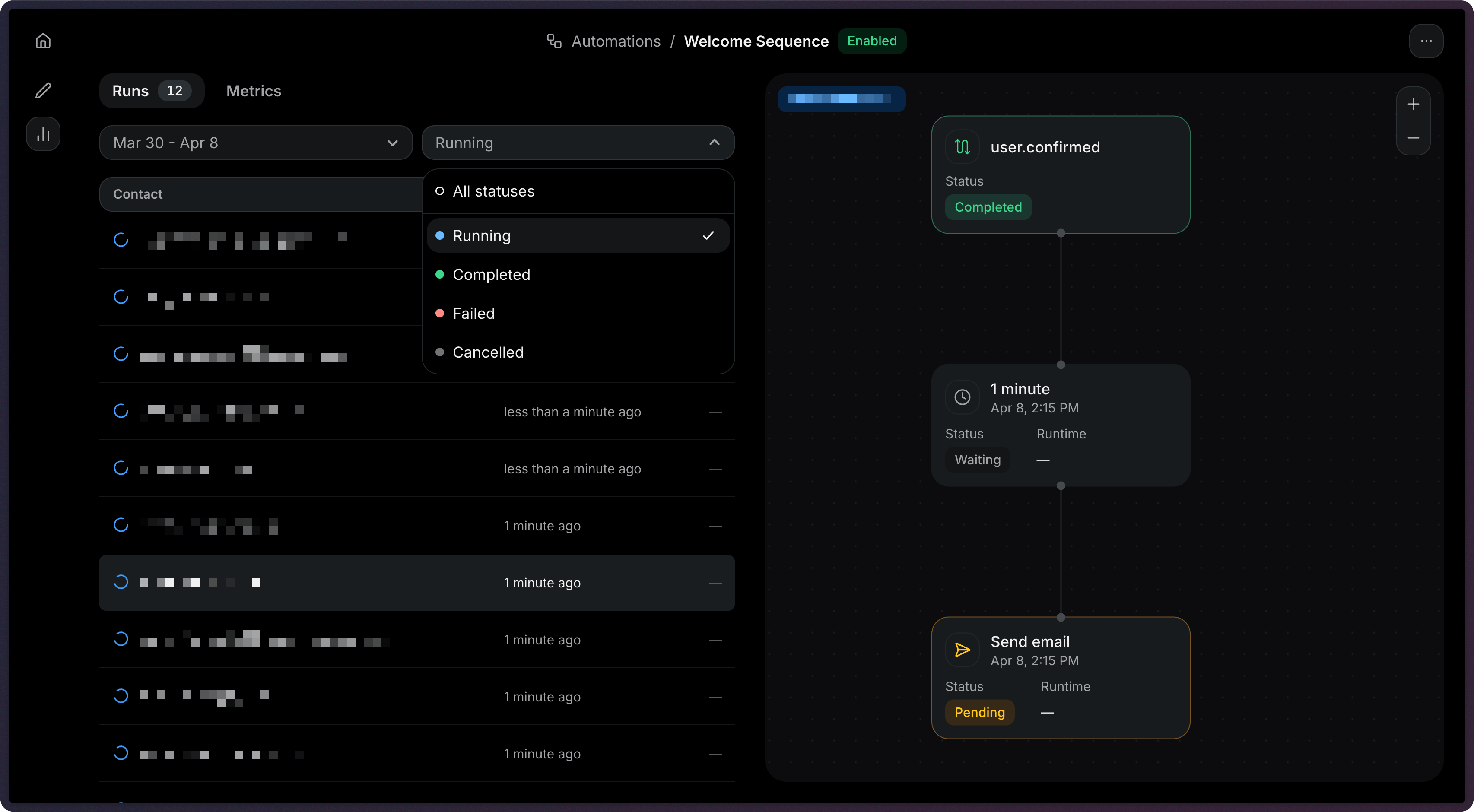
You can filter by multiple statuses using a comma-separated list.
import { Resend } from 'resend';

const resend = new Resend('re_xxxxxxxxx');

const { data, error } = await resend.automations.runs.list({
  automationId: 'c9b16d4f-ba6c-4e2e-b044-6bf4404e57fd',
  status: ['running', 'completed'],
});$resend = Resend::client('re_xxxxxxxxx');
$resend->automations->runs->list('c9b16d4f-ba6c-4e2e-b044-6bf4404e57fd', [
'status' => 'running,completed',
]);import resend
resend.api_key = "re_xxxxxxxxx"
resend.Automations.Runs.list(
"c9b16d4f-ba6c-4e2e-b044-6bf4404e57fd",
params={"status": "running,completed"},
)require "resend"
Resend.api_key = "re_xxxxxxxxx"
Resend::Automations::Runs.list(
"c9b16d4f-ba6c-4e2e-b044-6bf4404e57fd",
status: "running,completed",
)package main
import (
"context"
"github.com/resend/resend-go/v4"
)
func main() {
client := resend.NewClient("re_xxxxxxxxx")
client.Automations.ListRunsWithContext(
context.TODO(),
"c9b16d4f-ba6c-4e2e-b044-6bf4404e57fd",
&resend.ListAutomationRunsOptions{
Status: []resend.AutomationRunStatus{
resend.AutomationRunStatusRunning,
resend.AutomationRunStatusCompleted,
},
},
)
}use resend_rs::{list_opts::ListOptions, Resend, Result};
#[tokio::main]
async fn main() -> Result<()> {
let resend = Resend::new("re_xxxxxxxxx");
let _runs = resend
.automations
.list_runs(
"c9b16d4f-ba6c-4e2e-b044-6bf4404e57fd",
Some("running,completed".to_owned()),
ListOptions::default(),
)
.await?;
Ok(())
}import com.resend.*;
import com.resend.core.exception.ResendException;
import com.resend.services.automations.model.ListAutomationRunsParams;
import com.resend.services.automations.model.ListAutomationRunsResponseSuccess;
import com.resend.services.automations.model.RunStatus;
public class Main {
public static void main(String[] args) throws ResendException {
Resend resend = new Resend("re_xxxxxxxxx");
ListAutomationRunsParams params = ListAutomationRunsParams.builder()
.status(RunStatus.RUNNING, RunStatus.COMPLETED)
.build();
ListAutomationRunsResponseSuccess data = resend.automations().listRuns("c9b16d4f-ba6c-4e2e-b044-6bf4404e57fd", params);
}
}using Resend;
IResend resend = ResendClient.Create( "re_xxxxxxxxx" ); // Or from DI
var resp = await resend.AutomationRunListAsync(
new Guid( "c9b16d4f-ba6c-4e2e-b044-6bf4404e57fd" ),
new AutomationRunListQuery() { Status = "running,completed" }
);curl -X GET 'https://api.resend.com/automations/c9b16d4f-ba6c-4e2e-b044-6bf4404e57fd/runs?status=running,completed' \
-H 'Authorization: Bearer re_xxxxxxxxx'resend automations runs list c9b16d4f-ba6c-4e2e-b044-6bf4404e57fdViewing a single run
Section titled “Viewing a single run”Click on a run to view its details, and select the step you want to debug.
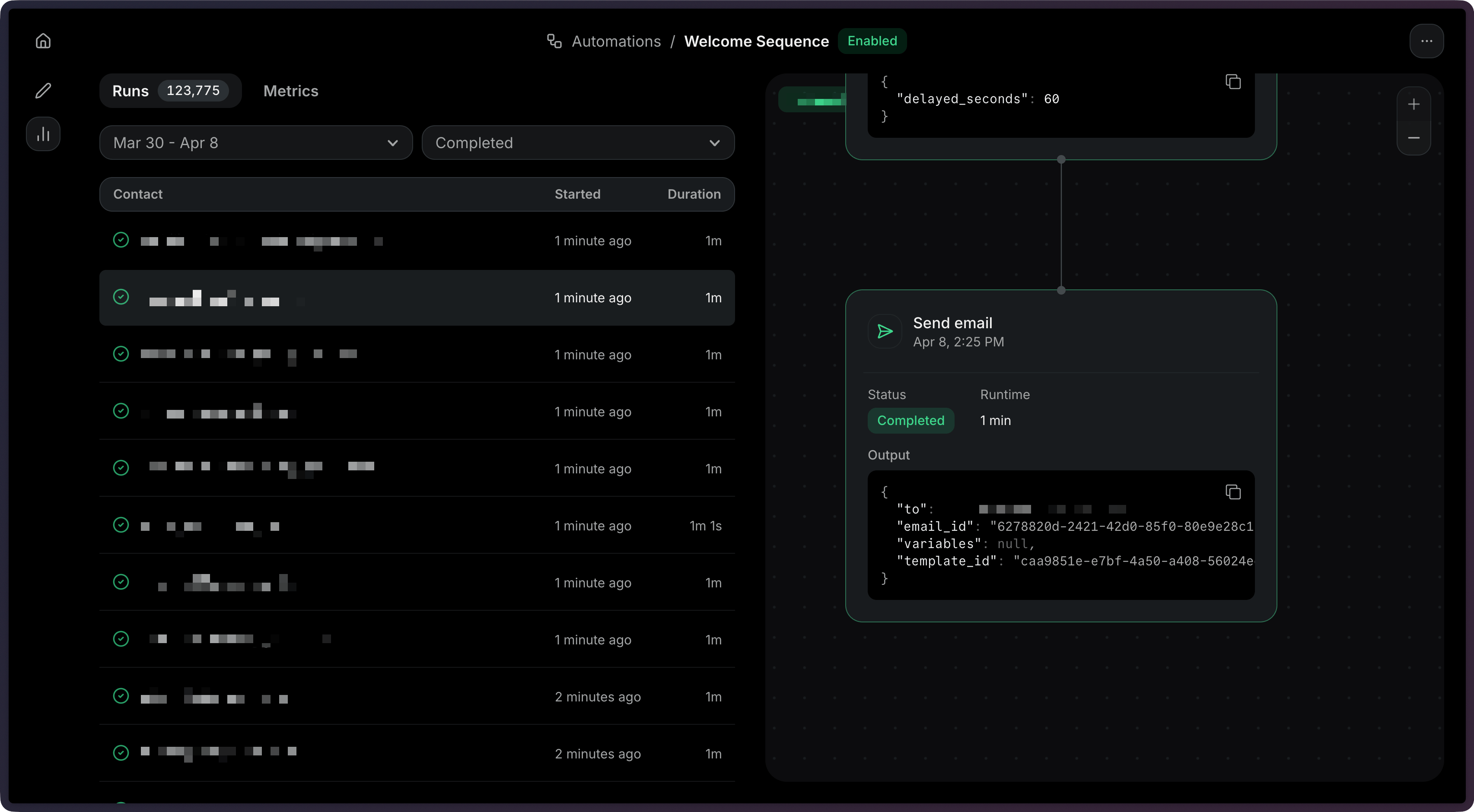
Get the details of a specific run:
import { Resend } from 'resend';

const resend = new Resend('re_xxxxxxxxx');

const { data, error } = await resend.automations.runs.get({
  automationId: 'c9b16d4f-ba6c-4e2e-b044-6bf4404e57fd',
  runId: 'a1b2c3d4-e5f6-7890-abcd-ef1234567890',
});$resend = Resend::client('re_xxxxxxxxx');
$resend->automations->runs->get(
'c9b16d4f-ba6c-4e2e-b044-6bf4404e57fd',
'a1b2c3d4-e5f6-7890-abcd-ef1234567890',
);import resend
resend.api_key = "re_xxxxxxxxx"
resend.Automations.Runs.get(
"c9b16d4f-ba6c-4e2e-b044-6bf4404e57fd",
"a1b2c3d4-e5f6-7890-abcd-ef1234567890",
)require "resend"
Resend.api_key = "re_xxxxxxxxx"
Resend::Automations::Runs.get(
"c9b16d4f-ba6c-4e2e-b044-6bf4404e57fd",
"a1b2c3d4-e5f6-7890-abcd-ef1234567890",
)package main
import "github.com/resend/resend-go/v4"
func main() {
client := resend.NewClient("re_xxxxxxxxx")
client.Automations.GetRun(
"c9b16d4f-ba6c-4e2e-b044-6bf4404e57fd",
"a1b2c3d4-e5f6-7890-abcd-ef1234567890",
)
}use resend_rs::{Resend, Result};
#[tokio::main]
async fn main() -> Result<()> {
let resend = Resend::new("re_xxxxxxxxx");
let _run = resend
.automations
.get_run(
"c9b16d4f-ba6c-4e2e-b044-6bf4404e57fd",
"a1b2c3d4-e5f6-7890-abcd-ef1234567890",
)
.await?;
Ok(())
}import com.resend.*;
import com.resend.services.automations.model.AutomationRun;
import com.resend.services.automations.model.GetAutomationRunOptions;
Resend resend = new Resend("re_xxxxxxxxx");
AutomationRun data = resend.automations().getRun(
GetAutomationRunOptions.builder()
.automationId("c9b16d4f-ba6c-4e2e-b044-6bf4404e57fd")
.runId("a1b2c3d4-e5f6-7890-abcd-ef1234567890")
.build()
);using Resend;
IResend resend = ResendClient.Create( "re_xxxxxxxxx" ); // Or from DI
var resp = await resend.AutomationRunRetrieveAsync(
new Guid( "c9b16d4f-ba6c-4e2e-b044-6bf4404e57fd" ),
new Guid( "a1b2c3d4-e5f6-7890-abcd-ef1234567890" )
);
Console.WriteLine( "Status={0}", resp.Content.Status );curl -X GET 'https://api.resend.com/automations/c9b16d4f-ba6c-4e2e-b044-6bf4404e57fd/runs/a1b2c3d4-e5f6-7890-abcd-ef1234567890' \
-H 'Authorization: Bearer re_xxxxxxxxx'resend automations runs get --automation-id c9b16d4f-ba6c-4e2e-b044-6bf4404e57fd --run-id a1b2c3d4-e5f6-7890-abcd-ef1234567890Response:
{
  "object": "automation_run",
  "id": "a1b2c3d4-e5f6-7890-abcd-ef1234567890",
  "status": "completed",
  "started_at": "2026-10-01 12:00:00.000000+00",
  "completed_at": "2026-10-01 12:05:00.000000+00",
  "created_at": "2026-10-01 12:00:00.000000+00",
  "steps": [
    {
      "key": "start",
      "type": "trigger",
      "status": "completed",
      "started_at": "2026-10-01 12:00:00.000000+00",
      "completed_at": "2026-10-01 12:00:01.000000+00",
      "output": null,
      "error": null
    },
    {
      "key": "welcome",
      "type": "send_email",
      "status": "completed",
      "started_at": "2026-10-01 12:00:01.000000+00",
      "completed_at": "2026-10-01 12:00:02.000000+00",
      "output": {
        "to": "user@example.com",
        "email_id": "6278820d-2421-42d0-85f0-80e9e28c1c69",
        "template": {
          "id": "caa9851e-e7bf-4a50-a408-56024edc19c0",
          "variables": null
        }
      },
      "error": null
    }
  ]
}
Each step in the response includes:
| Field | Description |
|---|---|
key | The unique key of the step in the automation graph |
type | The step type (e.g., trigger, send_email, delay) |
status | The step's execution status |
started_at | When the step started executing |
completed_at | When the step finished |
output | Output data from the step (if any) |
error | Error details if the step failed |
View the Retrieve Automation Run API reference for more details.
Debugging failed runs
Section titled “Debugging failed runs”Go to the Runs tab and click on a run to view the details.
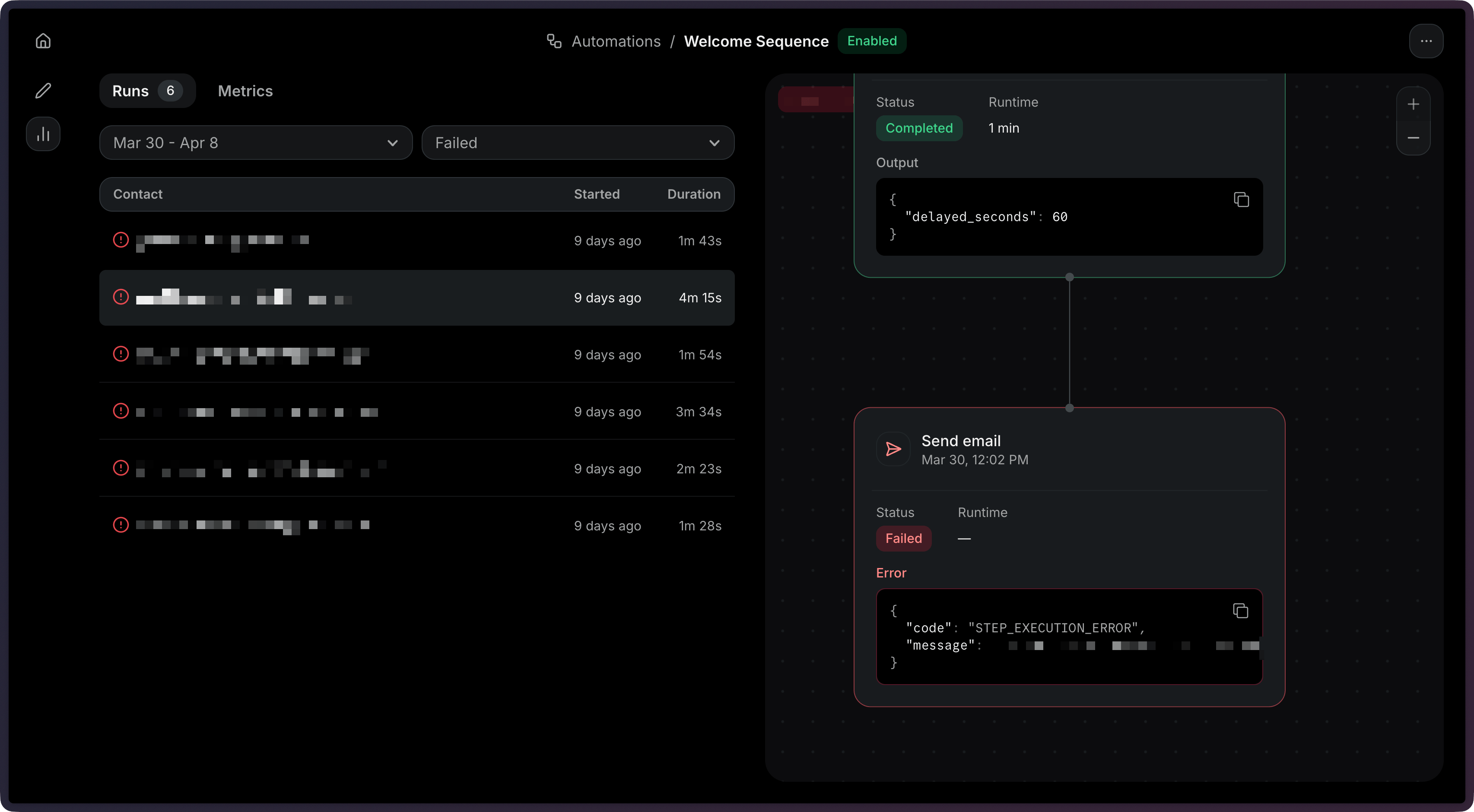
Get the details of a specific failed run:
import { Resend } from 'resend';

const resend = new Resend('re_xxxxxxxxx');

const { data, error } = await resend.automations.runs.get({
  automationId: 'c9b16d4f-ba6c-4e2e-b044-6bf4404e57fd',
  runId: 'a1b2c3d4-e5f6-7890-abcd-ef1234567890',
});$resend = Resend::client('re_xxxxxxxxx');
$resend->automations->runs->get(
'c9b16d4f-ba6c-4e2e-b044-6bf4404e57fd',
'a1b2c3d4-e5f6-7890-abcd-ef1234567890',
);import resend
resend.api_key = "re_xxxxxxxxx"
resend.Automations.Runs.get(
"c9b16d4f-ba6c-4e2e-b044-6bf4404e57fd",
"a1b2c3d4-e5f6-7890-abcd-ef1234567890",
)require "resend"
Resend.api_key = "re_xxxxxxxxx"
Resend::Automations::Runs.get(
"c9b16d4f-ba6c-4e2e-b044-6bf4404e57fd",
"a1b2c3d4-e5f6-7890-abcd-ef1234567890",
)package main
import "github.com/resend/resend-go/v4"
func main() {
client := resend.NewClient("re_xxxxxxxxx")
client.Automations.GetRun(
"c9b16d4f-ba6c-4e2e-b044-6bf4404e57fd",
"a1b2c3d4-e5f6-7890-abcd-ef1234567890",
)
}use resend_rs::{Resend, Result};
#[tokio::main]
async fn main() -> Result<()> {
let resend = Resend::new("re_xxxxxxxxx");
let _run = resend
.automations
.get_run(
"c9b16d4f-ba6c-4e2e-b044-6bf4404e57fd",
"a1b2c3d4-e5f6-7890-abcd-ef1234567890",
)
.await?;
Ok(())
}import com.resend.*;
import com.resend.services.automations.model.AutomationRun;
import com.resend.services.automations.model.GetAutomationRunOptions;
Resend resend = new Resend("re_xxxxxxxxx");
AutomationRun data = resend.automations().getRun(
GetAutomationRunOptions.builder()
.automationId("c9b16d4f-ba6c-4e2e-b044-6bf4404e57fd")
.runId("a1b2c3d4-e5f6-7890-abcd-ef1234567890")
.build()
);using Resend;
IResend resend = ResendClient.Create( "re_xxxxxxxxx" ); // Or from DI
var resp = await resend.AutomationRunRetrieveAsync(
new Guid( "c9b16d4f-ba6c-4e2e-b044-6bf4404e57fd" ),
new Guid( "a1b2c3d4-e5f6-7890-abcd-ef1234567890" )
);
Console.WriteLine( "Status={0}", resp.Content.Status );curl -X GET 'https://api.resend.com/automations/c9b16d4f-ba6c-4e2e-b044-6bf4404e57fd/runs/a1b2c3d4-e5f6-7890-abcd-ef1234567890' \
-H 'Authorization: Bearer re_xxxxxxxxx'resend automations runs get --automation-id c9b16d4f-ba6c-4e2e-b044-6bf4404e57fd --run-id a1b2c3d4-e5f6-7890-abcd-ef1234567890When a run fails, use the step-level details to identify the issue:
- List failed runs: Filter runs by
status=failedto find problematic executions. - Retrieve the run: Get the full run details including the
stepsarray. - Find the failed step: Look for the step with a
failedstatus. - Check the error: The
errorfield on the failed step contains details about what went wrong.
Common failure scenarios:
- Condition error: A referenced field may not exist in the event payload. See Condition for how conditions are evaluated.
- Wait for event timeout: The expected event was not received within the timeout window.
- Send email failed: The template may not be published, or the sender address may not be verified.
Stopping an Automation
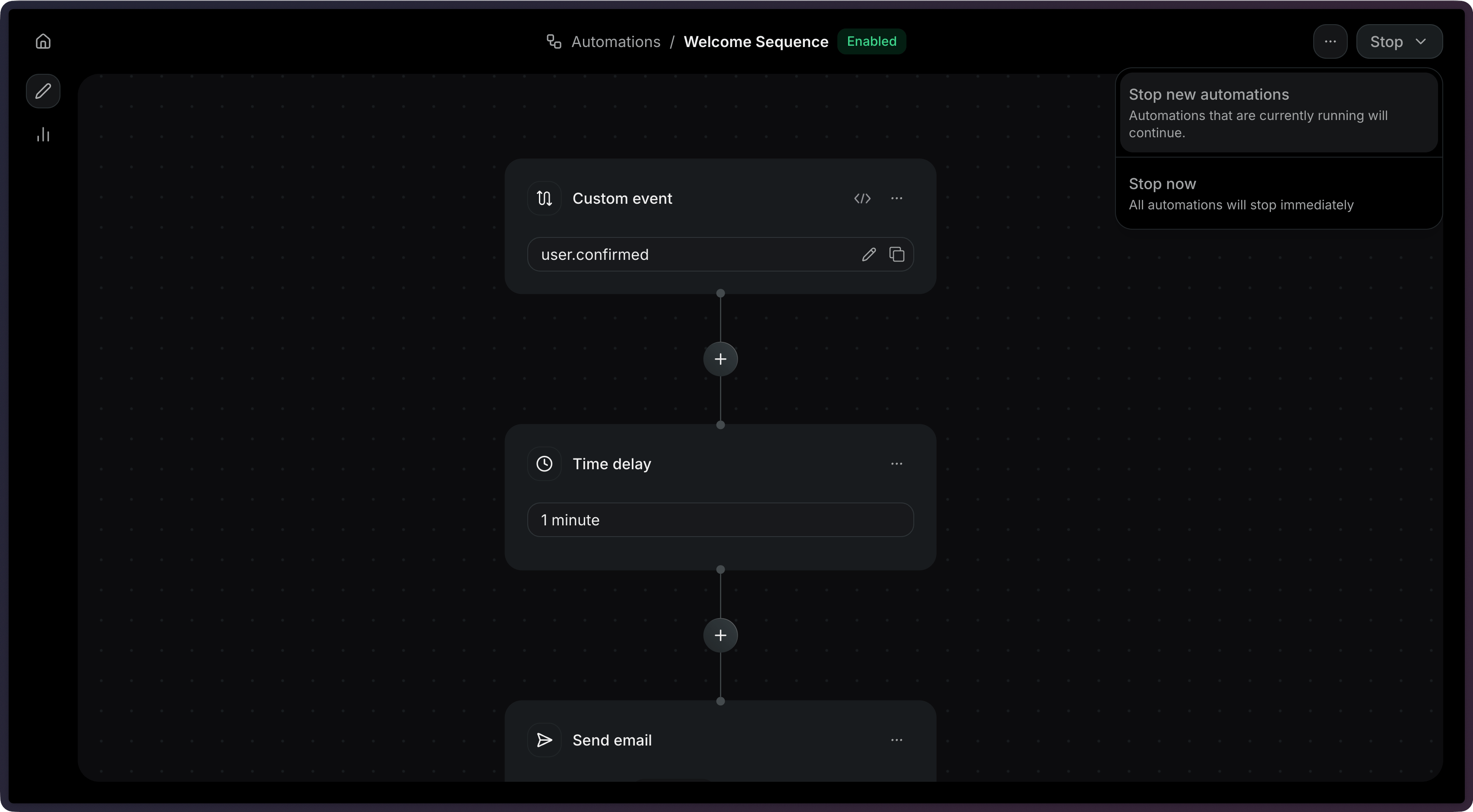
Section titled “Stopping an Automation”Click on the Stop button to stop an Automation.
Stop an Automation programmatically:
import { Resend } from 'resend';

const resend = new Resend('re_xxxxxxxxx');

const { data, error } = await resend.automations.stop(
  'c9b16d4f-ba6c-4e2e-b044-6bf4404e57fd',
);$resend = Resend::client('re_xxxxxxxxx');
$resend->automations->stop('c9b16d4f-ba6c-4e2e-b044-6bf4404e57fd');import resend
resend.api_key = "re_xxxxxxxxx"
resend.Automations.stop("c9b16d4f-ba6c-4e2e-b044-6bf4404e57fd")require "resend"
Resend.api_key = "re_xxxxxxxxx"
Resend::Automations.stop("c9b16d4f-ba6c-4e2e-b044-6bf4404e57fd")package main
import "github.com/resend/resend-go/v4"
func main() {
client := resend.NewClient("re_xxxxxxxxx")
client.Automations.Stop("c9b16d4f-ba6c-4e2e-b044-6bf4404e57fd")
}use resend_rs::{Resend, Result};
#[tokio::main]
async fn main() -> Result<()> {
let resend = Resend::new("re_xxxxxxxxx");
let _automation = resend
.automations
.stop("c9b16d4f-ba6c-4e2e-b044-6bf4404e57fd")
.await?;
Ok(())
}import com.resend.*;
import com.resend.services.automations.model.StopAutomationResponseSuccess;
Resend resend = new Resend("re_xxxxxxxxx");
StopAutomationResponseSuccess data = resend.automations().stop("c9b16d4f-ba6c-4e2e-b044-6bf4404e57fd");using Resend;
IResend resend = ResendClient.Create( "re_xxxxxxxxx" ); // Or from DI
var resp = await resend.AutomationStopAsync( new Guid( "c9b16d4f-ba6c-4e2e-b044-6bf4404e57fd" ) );
Console.WriteLine( "Status={0}", resp.Content.Status );curl -X POST 'https://api.resend.com/automations/c9b16d4f-ba6c-4e2e-b044-6bf4404e57fd/stop' \
-H 'Authorization: Bearer re_xxxxxxxxx'resend automations stop c9b16d4f-ba6c-4e2e-b044-6bf4404e57fdView the Stop Automation API reference for more details.
Viewing Metrics
Section titled “Viewing Metrics”In the dashboard, you can view overall metrics for any Automation. In the Observability panel for any Automation, select Metrics.
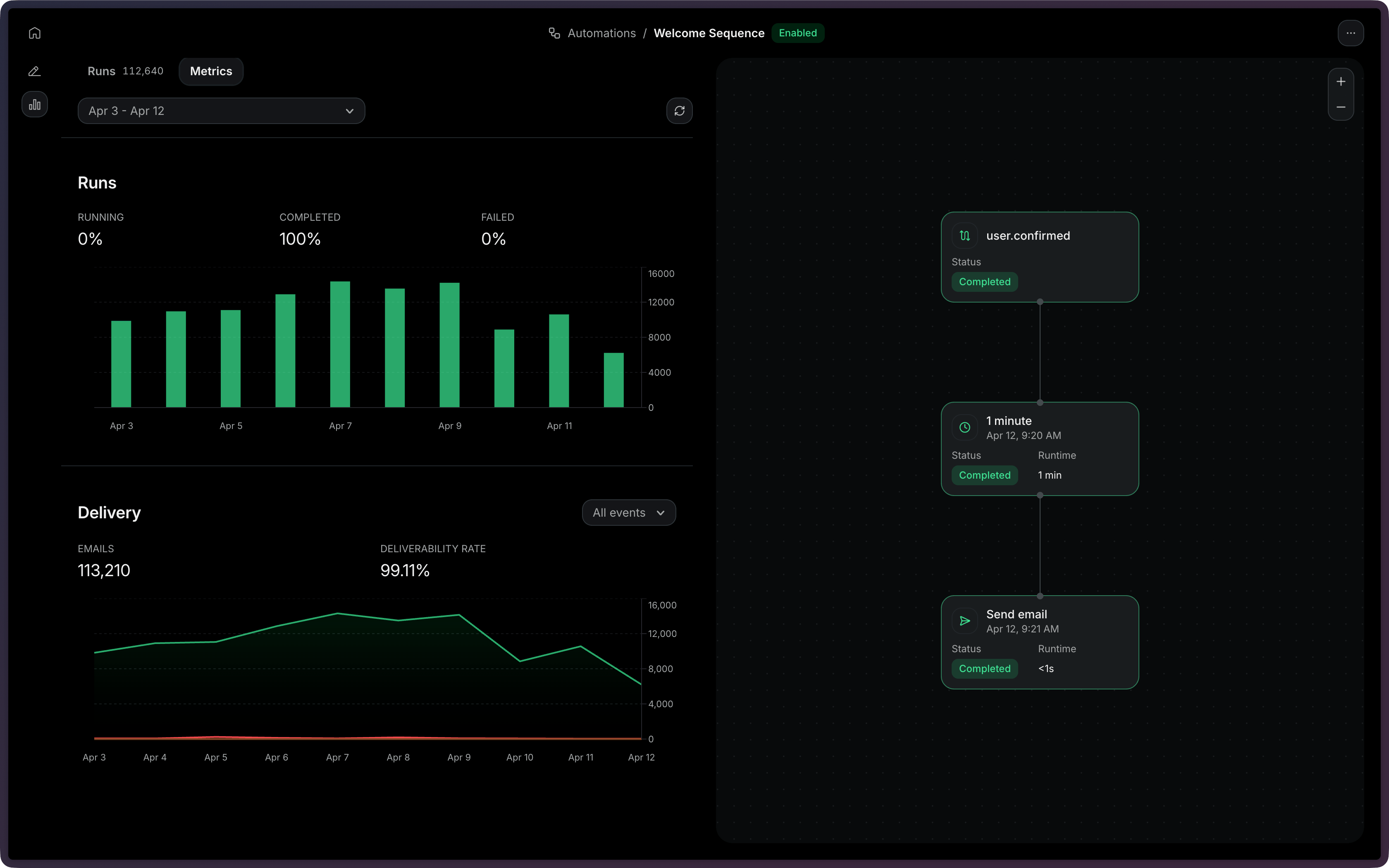
The API does not support fetching metrics for an Automation.