Working with Variables
Template Variables
Section titled “Template Variables”Custom Template variables provide your team flexibility when sending emails. Define custom variables for your Template with optional fallback values which will be replaced with the actual values when sending the email.
Each Template may contain up to 50 variables. You can define and then reference these variables in your Template to send emails with personalized content.
Create custom variables
Section titled “Create custom variables”To add a custom variable to your Template, select Variable in the commands palette or type {{ in the Dashboard editor. Define the name, type, and fallback_value (optional).
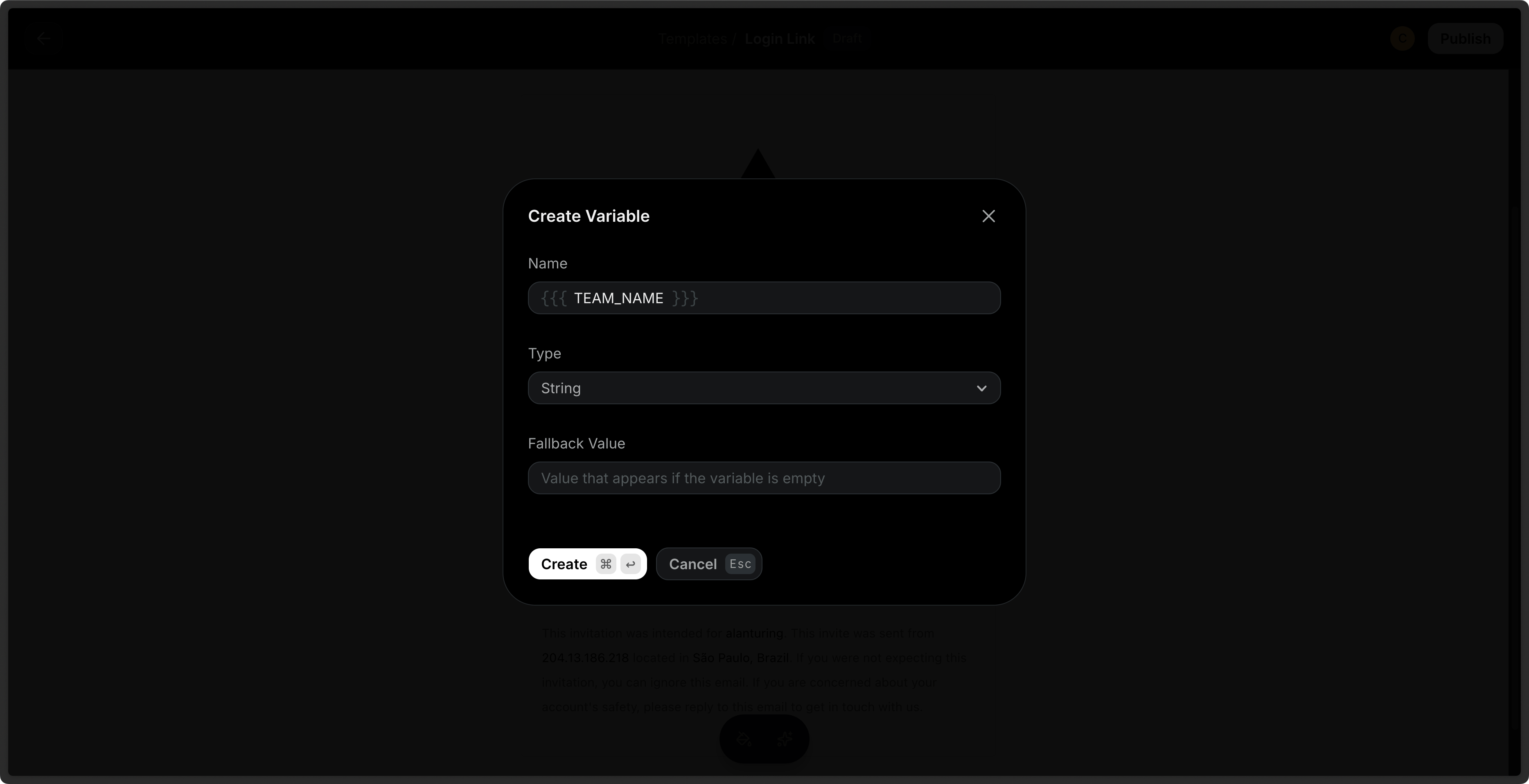
You can also define custom variables when you create a Template via the API. The payload can optionally include variables to be used in the Template.
import { Resend } from 'resend';

const resend = new Resend('re_xxxxxxxxx');

await resend.templates.create({
  name: 'order-confirmation',
  html: '<p>Name: {{{PRODUCT}}}</p><p>Total: {{{PRICE}}}</p>',
  variables: [
    {
      key: 'PRODUCT',
      type: 'string',
      fallbackValue: 'item',
    },
    {
      key: 'PRICE',
      type: 'number',
      fallbackValue: 25,
    },
  ],
});$resend = Resend::client('re_xxxxxxxxx');
$resend->templates->create([
'name' => 'order-confirmation',
'html' => '<p>Name: {{{PRODUCT}}}</p><p>Total: {{{PRICE}}}</p>',
'variables' => [
[
'key' => 'PRODUCT',
'type' => 'string',
'fallback_value' => 'item',
],
[
'key' => 'PRICE',
'type' => 'number',
'fallback_value' => 25,
]
],
]);import resend
resend.api_key = "re_xxxxxxxxx"
resend.Templates.create({
"name": "order-confirmation",
"html": "<p>Name: {{{PRODUCT}}}</p><p>Total: {{{PRICE}}}</p>",
"variables": [
{
"key": "PRODUCT",
"type": "string",
"fallback_value": "item",
},
{
"key": "PRICE",
"type": "number",
"fallback_value": 25,
}
],
})require "resend"
Resend.api_key = "re_xxxxxxxxx"
Resend::Templates.create(
name: "order-confirmation",
html: "<p>Name: {{{PRODUCT}}}</p><p>Total: {{{PRICE}}}</p>",
variables: [
{
key: "PRODUCT",
type: "string",
fallback_value: "item"
},
{
key: "PRICE",
type: "number",
fallback_value: 25
}
]
)package main
import (
"context"
"github.com/resend/resend-go/v4"
)
func main() {
client := resend.NewClient("re_xxxxxxxxx")
client.Templates.CreateWithContext(context.TODO(), &resend.CreateTemplateRequest{
Name: "order-confirmation",
Html: "<p>Name: {{{PRODUCT}}}</p><p>Total: {{{PRICE}}}</p>",
Variables: []*resend.TemplateVariable{
{
Key: "PRODUCT",
Type: resend.VariableTypeString,
FallbackValue: "item",
},
{
Key: "PRICE",
Type: resend.VariableTypeNumber,
FallbackValue: 25,
},
},
})
}use resend_rs::{
types::{CreateTemplateOptions, Variable, VariableType},
Resend, Result,
};
#[tokio::main]
async fn main() -> Result<()> {
let resend = Resend::new("re_xxxxxxxxx");
let name = "order-confirmation";
let html = "<p>Name: {{{PRODUCT}}}</p><p>Total: {{{PRICE}}}</p>";
let variables = [
Variable::new("PRODUCT", VariableType::String).with_fallback("item"),
Variable::new("PRICE", VariableType::Number).with_fallback(25)
];
let opts = CreateTemplateOptions::new(name, html).with_variables(&variables);
let template = resend.templates.create(opts).await?;
let _published = resend.templates.publish(&template.id).await?;
Ok(())
}import com.resend.*;
import com.resend.core.exception.ResendException;
import com.resend.services.templates.model.CreateTemplateOptions;
import com.resend.services.templates.model.CreateTemplateResponseSuccess;
import com.resend.services.templates.model.Variable;
import com.resend.services.templates.model.VariableType;
public class Main {
public static void main(String[] args) throws ResendException {
Resend resend = new Resend("re_xxxxxxxxx");
CreateTemplateOptions params = CreateTemplateOptions.builder()
.name("order-confirmation")
.html("<p>Name: {{{PRODUCT}}}</p><p>Total: {{{PRICE}}}</p>")
.addVariable(new Variable("PRODUCT", VariableType.STRING, "item"))
.addVariable(new Variable("PRICE", VariableType.NUMBER, 25))
.build();
CreateTemplateResponseSuccess data = resend.templates().create(params);
}
}using Resend;
IResend resend = ResendClient.Create("re_xxxxxxxxx");
var variables = new List<TemplateVariable>()
{
new TemplateVariable() {
Key = "PRODUCT",
Type = TemplateVariableType.String,
Default = "item",
},
new TemplateVariable() {
Key = "PRICE",
Type = TemplateVariableType.Number,
Default = 25,
}
};
var resp = await resend.TemplateCreateAsync(
new TemplateData()
{
Name = "welcome-email",
HtmlBody = "<strong>Hey, {{{PRODUCT}}}, you are {{{PRICE}}} years old.</strong>",
Variables = variables,
}
);
Console.WriteLine($"Template Id={resp.Content}");curl -X POST 'https://api.resend.com/templates' \
-H 'Authorization: Bearer re_xxxxxxxxx' \
-H 'Content-Type: application/json' \
-d $'{
"name": "order-confirmation",
"html": "<p>Name: {{{PRODUCT}}}</p><p>Total: {{{PRICE}}}</p>",
"variables": [
{
"key": "PRODUCT",
"type": "string",
"fallback_value": "item"
},
{
"key": "PRICE",
"type": "number",
"fallback_value": 25
}
]
}'Each variable is an object with the following properties:
key: The key of the variable, commonly uppercase (e.g.,PRODUCT_NAME).type: The type of the variable ('string'or'number').fallback_value: The fallback value of the variable. If no fallback value is provided, you must provide a value for the variable when sending an email using the Template.
See the API reference for more details.
Fallback values
Section titled “Fallback values”When you define a variable, you can optionally define a fallback value. This value will be used when sending the email if you fail to provide a value in your call.
In the editor, if you fail to provide a fallback value, a warning sign will show for the variable. To edit a variable's fallback value, click on the variable chip in your Template and use the Inspector sidebar on the right to update the fallback value.
You can also include fallback values when creating a Template via the API.
Send Test Emails
Section titled “Send Test Emails”You can send test emails to your inbox to preview your Template before sending it to your audience. Provide variable values to test the rendered Template in your inbox.
Send a Template with Variables
Section titled “Send a Template with Variables”When sending a transactional email, you can reference your Template and include your variables in the call. The Template variables will be replaced with the actual values.
id: id of the published Templatevariables: array of variable objects (if applicable)
Both the /emails and /emails/batch endpoints support Templates.
import { Resend } from 'resend';

const resend = new Resend('re_xxxxxxxxx');

const { data, error } = await resend.emails.send({
  from: 'Acme <onboarding@resend.dev>',
  to: ['delivered@resend.dev'],
  subject: 'hello world',
  template: {
    id: 'f3b9756c-f4f4-44da-bc00-9f7903c8a83f',
    variables: {
      PRODUCT: 'Laptop',
    },
  },
});$resend = Resend::client('re_xxxxxxxxx');
$resend->emails->send([
'from' => 'Acme <onboarding@resend.dev>',
'to' => ['delivered@resend.dev'],
'subject' => 'hello world',
'template'=> [
'id' => 'f3b9756c-f4f4-44da-bc00-9f7903c8a83f',
'variables' => [
'PRODUCT' => 'Laptop'
]
]
]);import resend
resend.api_key = "re_xxxxxxxxx"
params: resend.Emails.SendParams = {
"from": "Acme <onboarding@resend.dev>",
"to": ["delivered@resend.dev"],
"subject": "hello world",
"template": {
"id": "f3b9756c-f4f4-44da-bc00-9f7903c8a83f",
"variables": {
"PRODUCT": "Laptop",
},
},
}
email = resend.Emails.send(params)require 'resend'
Resend.api_key = 're_xxxxxxxxx'
params = {
from: 'Acme <onboarding@resend.dev>',
to: ['delivered@resend.dev'],
subject: 'hello world',
template: {
id: 'f3b9756c-f4f4-44da-bc00-9f7903c8a83f',
variables: {
'PRODUCT': 'Laptop'
}
}
}
email = Resend::Emails.send(params)package main
import (
"context"
"github.com/resend/resend-go/v4"
)
func main() {
client := resend.NewClient("re_xxxxxxxxx")
params := &resend.SendEmailRequest{
From: "Acme <onboarding@resend.dev>",
To: []string{"delivered@resend.dev"},
Subject: "hello world",
Template: &resend.EmailTemplate{
Id: "f3b9756c-f4f4-44da-bc00-9f7903c8a83f",
Variables: map[string]interface{}{
"PRODUCT": "Laptop",
},
},
}
client.Emails.SendWithContext(context.TODO(), params)
}use resend_rs::{
json,
types::{CreateEmailBaseOptions, EmailTemplate},
Resend, Result,
};
use std::collections::HashMap;
#[tokio::main]
async fn main() -> Result<()> {
let resend = Resend::new("re_xxxxxxxxx");
let from = "Acme <onboarding@resend.dev>";
let to = ["delivered@resend.dev"];
let subject = "hello world";
let mut variables = HashMap::new();
variables.insert("PRODUCT".to_string(), json!("Laptop"));
let template = EmailTemplate::new("f3b9756c-f4f4-44da-bc00-9f7903c8a83f").with_variables(variables);
let email = CreateEmailBaseOptions::new(from, to, subject).with_template(template);
let _email = resend.emails.send(email).await?;
Ok(())
}import com.resend.*;
import com.resend.core.exception.ResendException;
import com.resend.services.emails.model.CreateEmailOptions;
import com.resend.services.emails.model.CreateEmailResponse;
import com.resend.services.emails.model.Template;
import java.util.HashMap;
import java.util.Map;
public class Main {
public static void main(String[] args) throws ResendException {
Resend resend = new Resend("re_xxxxxxxxx");
Map<String, Object> variables = new HashMap<>();
variables.put("PRODUCT", "Laptop");
CreateEmailOptions params = CreateEmailOptions.builder()
.from("Acme <onboarding@resend.dev>")
.to("delivered@resend.dev")
.subject("hello world")
.template(Template.builder()
.id("f3b9756c-f4f4-44da-bc00-9f7903c8a83f")
.variables(variables)
.build())
.build();
CreateEmailResponse data = resend.emails().send(params);
}
}using Resend;
IResend resend = ResendClient.Create( "re_xxxxxxxxx" ); // Or from DI
var resp = await resend.EmailSendAsync( new EmailMessage()
{
From = "Acme <onboarding@resend.dev>",
To = "delivered@resend.dev",
Subject = "hello world",
Template = new EmailMessageTemplate() {
TemplateId = "f3b9756c-f4f4-44da-bc00-9f7903c8a83f",
Variables = new Dictionary<string, object>()
{
{ "PRODUCT", "Laptop" },
{ "PRICE", 1.23 }
}
}
} );
Console.WriteLine( "Email Id={0}", resp.Content );curl -X POST 'https://api.resend.com/emails' \
-H 'Authorization: Bearer re_xxxxxxxxx' \
-H 'Content-Type: application/json' \
-d $'{
"from": "Acme <onboarding@resend.dev>",
"to": ["delivered@resend.dev"],
"subject": "hello world",
"template": {
"id": "f3b9756c-f4f4-44da-bc00-9f7903c8a83f",
"variables": {
"PRODUCT": "Laptop"
}
}
}'Learn more about sending emails or sending batch emails with Templates via the API.
Validation errors
Section titled “Validation errors”When sending an email using a Template, the Template variables will be replaced with the actual values. If a variable is not provided, the fallback value will be used.
If no fallback value is provided, the email will not be sent and a validation error will be returned.
API Reference
Section titled “API Reference”For complete API documentation, see the Templates API reference and the template parameter of the Sending API.