Custom Events
Custom events are used to trigger automations and can be defined with an optional schema for payload validation.
If a schema is defined, payloads are validated when the event is sent. Fields that don't match the expected type are rejected with a 422 error and the event is not delivered.
Using the dashboard
Section titled “Using the dashboard”Click the Add Event button
Click Add event to create a new event.
Enter Event Details
Enter the event name and optional schema to define the event payload you will send with the event.
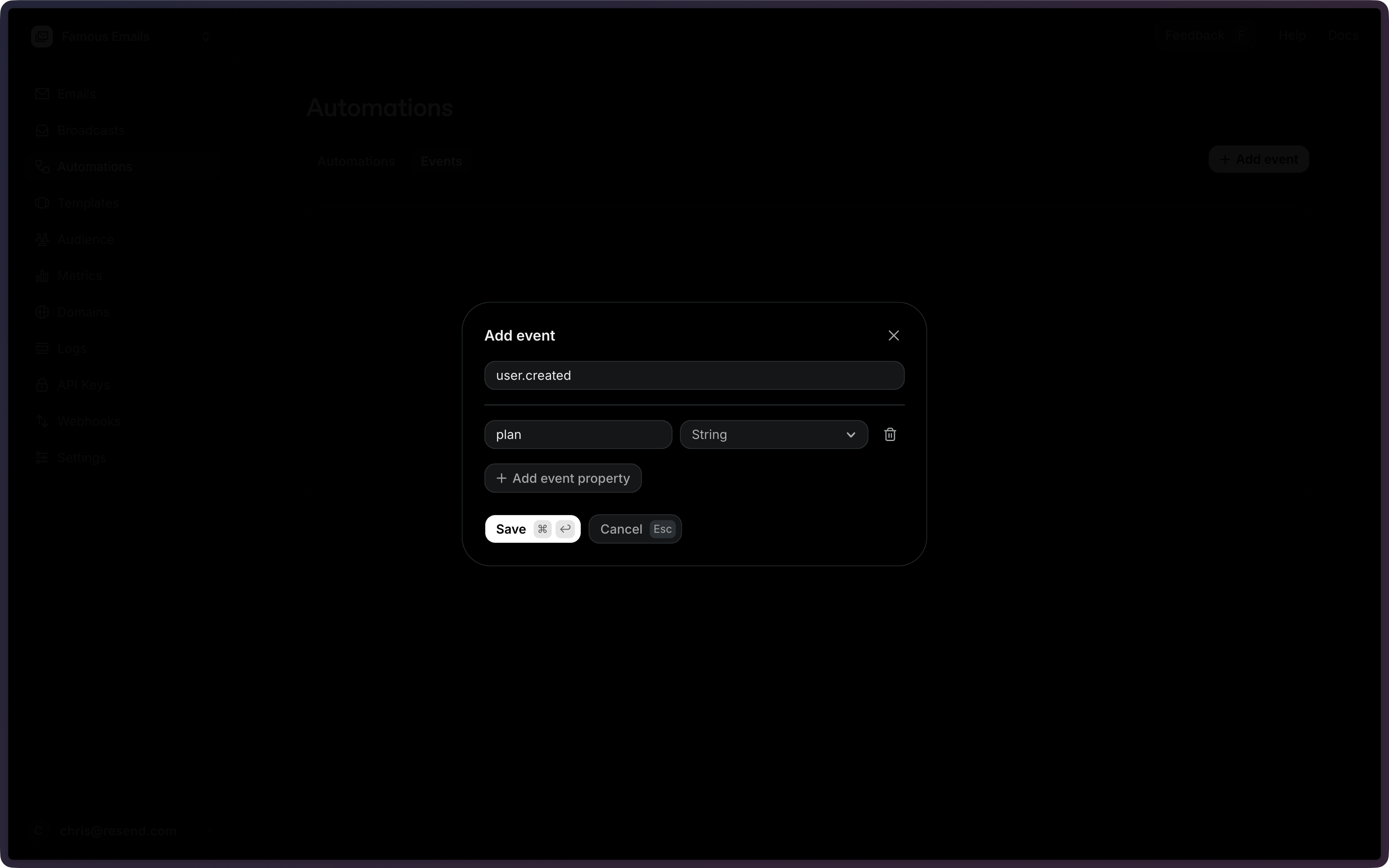
Save the Event
When you're done, Save the event.
Using the API
Section titled “Using the API”All existing events can be retrieved using the List Events API.
To create a new event, use the Create Event API and provide an event name and optional schema.
import { Resend } from 'resend';

const resend = new Resend('re_xxxxxxxxx');

const { data, error } = await resend.events.create({
  name: 'user.created',
  schema: {
    plan: 'string',
  },
});$resend = Resend::client('re_xxxxxxxxx');
$resend->events->create([
'name' => 'user.created',
'schema' => ['plan' => 'string'],
]);import resend
resend.api_key = "re_xxxxxxxxx"
params: resend.Events.CreateParams = {
"name": "user.created",
"schema": {
"plan": "string",
},
}
resend.Events.create(params)require "resend"
Resend.api_key = "re_xxxxxxxxx"
params = {
name: "user.created",
schema: {
plan: "string",
},
}
Resend::Events.create(params)package main
import "github.com/resend/resend-go/v4"
func main() {
client := resend.NewClient("re_xxxxxxxxx")
params := &resend.CreateEventRequest{
Name: "user.created",
Schema: map[string]string{
"plan": resend.EventSchemaTypeString,
},
}
client.Events.Create(params)
}use resend_rs::{json, types::CreateEventOptions, Resend, Result};
#[tokio::main]
async fn main() -> Result<()> {
let resend = Resend::new("re_xxxxxxxxx");
let opts = CreateEventOptions {
name: "user.created".to_owned(),
schema: json!({
"plan": "string",
}),
};
let _event = resend.events.create(opts).await?;
Ok(())
}import com.resend.*;
import com.resend.core.exception.ResendException;
import com.resend.services.events.model.CreateEventOptions;
import com.resend.services.events.model.CreateEventResponseSuccess;
public class Main {
public static void main(String[] args) throws ResendException {
Resend resend = new Resend("re_xxxxxxxxx");
CreateEventOptions params = CreateEventOptions.builder()
.name("user.created")
.addSchema("plan", "string")
.build();
CreateEventResponseSuccess data = resend.events().create(params);
}
}using Resend;
using System.Text.Json;
IResend resend = ResendClient.Create( "re_xxxxxxxxx" );
var schema = JsonSerializer.SerializeToElement( new { plan = "string" } );
var resp = await resend.EventCreateAsync( new EventCreateData()
{
Name = "user.created",
Schema = schema,
} );
Console.WriteLine( "EventId={0}", resp.Content );curl -X POST 'https://api.resend.com/events' \
-H 'Authorization: Bearer re_xxxxxxxxx' \
-H 'Content-Type: application/json' \
-d '{
"name": "user.created",
"schema": {
"plan": "string"
}
}'resend events create --name user.created --schema '{"plan":"string"}'View the Create Event API reference for the full endpoint specification.
Configuration
Section titled “Configuration”config.name(string, required) — The name of the custom event to create. Used to match events to automation triggers.
config.schema(object) — An optional schema definition for the event payload. Must be an object with flat key/type pairs. Supported types:string,number,boolean,date.
{
  "schema": {
    "plan": "string",
    "amount": "number",
    "date": "date",
    "is_active": "boolean"
  }
}